Termius with GCP VMs over IAP on a Mac
Termius has no Google Cloud integration, and it ignores the
ProxyCommand line that gcloud uses to carry SSH through
Identity-Aware Proxy. To use Termius with a GCP VM that has no external IP, run an IAP tunnel
to a port on your Mac and add the VM in Termius as a host on 127.0.0.1. This
guide sets that up with gcloud, covers SFTP and port forwarding over the same
host, and lists what still needs another tool.
By Ostgate · Updated
Why Termius does not reach a private VM
A Compute Engine VM without an external IP accepts SSH only from inside its VPC network.
IAP TCP forwarding relays the connection: the client talks to Google over HTTPS, and IAP
connects to the VM's port 22 from 35.235.240.0/20. OpenSSH does this through a
ProxyCommand that runs gcloud. Termius uses its own SSH client, and
its guide to importing
hosts says that "ProxyCommand is not supported and will be ignored". A
JumpHost line becomes a Termius host chain, which only helps when the jump host
has an address Termius can reach, such as an external IP on bastion-1: the
public SSH endpoint that IAP lets you remove.
Two requests on the Termius ideas board cover this. ProxyCommand in Termius has been open since May 2022 and had 193 votes on 14 October 2026. Stay up to date with Google Cloud, which would import hosts from Google Cloud, had 243.
The project needs what any IAP connection needs, set once by an administrator (details in IAP TCP forwarding: firewall rule and IAM):
gcloud compute firewall-rules create allow-iap-ssh \
    --project=acme-prod --network=default \
    --direction=INGRESS --action=allow \
    --rules=tcp:22 \
    --source-ranges=35.235.240.0/20

gcloud projects add-iam-policy-binding acme-prod \
    --member=user:alice@example.com \
    --role=roles/iap.tunnelResourceAccessor
Connect Termius to a GCP VM through an IAP tunnel
With the Google Cloud CLI installed and signed in, gcloud compute
start-iap-tunnel listens on a port of your Mac and carries every connection to the VM
through IAP:
gcloud compute start-iap-tunnel example-vm 22 \
--local-host-port=localhost:2222 \
--zone=europe-west1-b --project=acme-prod
Leave it running. In Termius, add a host with these values:
- Address
127.0.0.1, SSH port2222. - Username: with OS Login, the one in your OS Login profile, which Compute Engine forms from
your email unless your organization set another, so
alice@example.combecomesalice_example_com. With metadata SSH keys, the user the key was added for. - Key: a private key the VM accepts. Running
gcloud compute sshonce creates~/.ssh/google_compute_engineand publishes its public half. Termius's documentation says it importsIdentityFileonly in the app downloaded from its website, so in other builds add the key to the host by hand.
Give each VM its own local port (2222, 2223 and so on) and its own Termius host. SSH clients remember a host key per address and port, so two VMs behind one port look like a single host whose key changed.
SFTP and port forwarding over the same host
SFTP runs inside the SSH connection, so Termius's SFTP browser works on the same host entry
and the same tunnel. Port forwarding rules do too. A Local rule on the
127.0.0.1:2222 host, with destination 127.0.0.1 and port
5432, puts PostgreSQL from example-vm on your Mac; Termius's docs say
to use 127.0.0.1 as the destination when the service runs on the selected host. A
direct IAP tunnel to port 5432 does the same without SSH, as the port forwarding guide shows.
A host chain works once the jump host sits behind a tunnel. Point a Termius host at a tunnel
to bastion-1, then chain hosts that use the internal IPs of other VMs through it.
The VPC firewall must let bastion-1 reach their port 22.
What the gcloud route leaves to you
- The
gcloudprocess must keep running. When it ends, Termius's next connection to127.0.0.1:2222is refused. Sleep and network changes end it too (see IAP tunnel slow or disconnecting). - Every VM costs a Terminal window and a port you pick and remember.
- Windows VMs need another app. Termius has no RDP client; RDP Protocol Support has been on its board since January 2021, with 1,633 votes on 14 October 2026. The RDP guide covers Windows App through a tunnel to port 3389.
Termius with Ostgate's tunnels, without gcloud
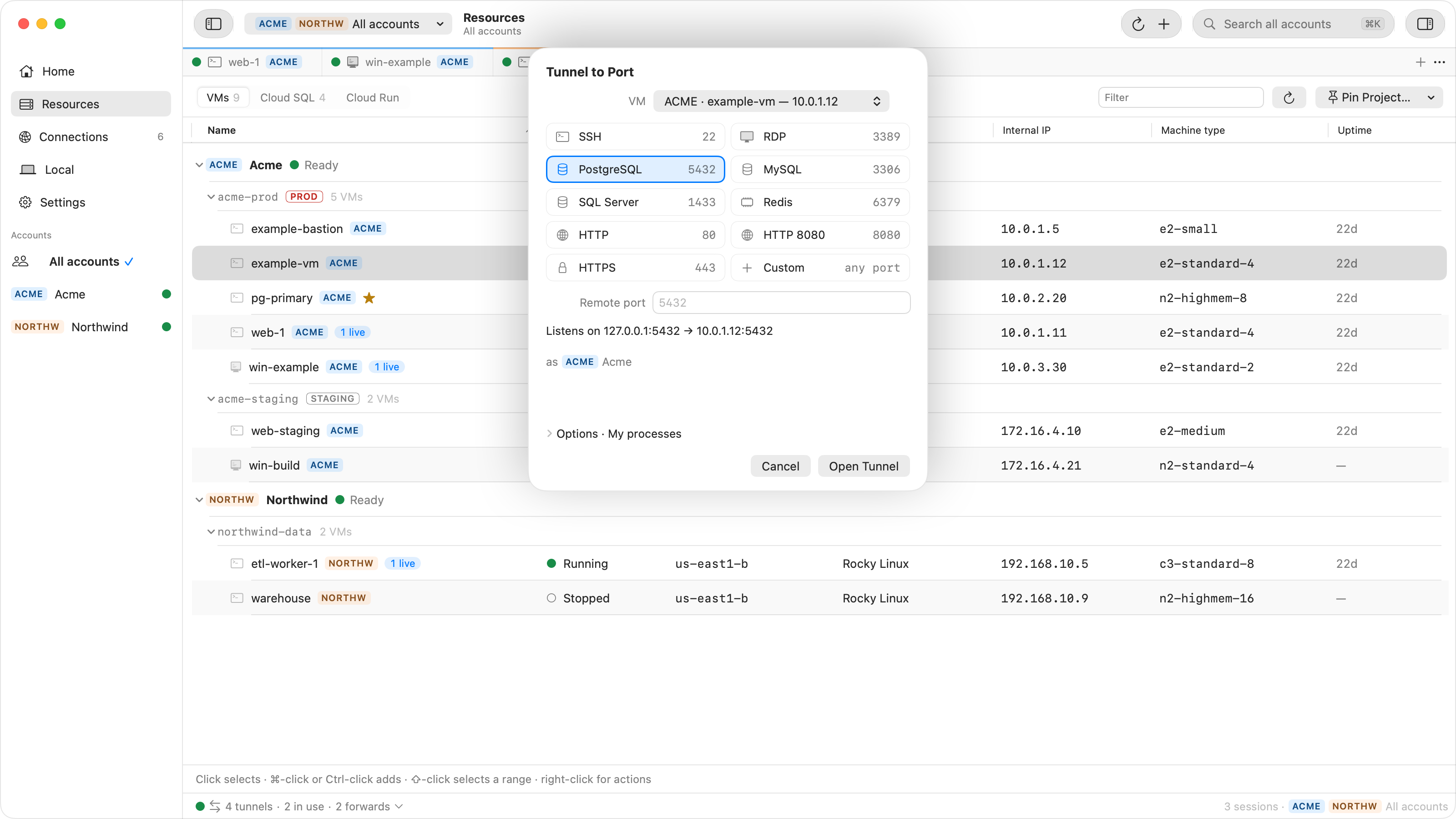
Ostgate is a native macOS app that opens IAP tunnels itself, as the Google account you sign
in with, so the Mac needs no gcloud. To give Termius a port:
- Choose Tunnel to Port… on the instance and pick the SSH preset.
- Under Options, set Access to My processes. The default for SSH, Ostgate only, refuses other apps, Termius included.
- Start the tunnel and enter the local port it shows in the Termius host, with
127.0.0.1as the address.
The local port stays the same between runs, so the Termius host keeps working. Tunnels keep running when you close the window, reconnect by themselves after a network drop, and with Start automatically when this account opens come back with their account. Ostgate also does two things Termius does not: its SSH tabs publish your key through OS Login or instance metadata, and it has an embedded Remote Desktop for Windows VMs.
When Termius does not connect
| Symptom | Check |
|---|---|
Connection refused on 127.0.0.1:2222 |
The tunnel is not running. Start start-iap-tunnel again, or the tunnel
in Ostgate. |
Tunnel closes with 4003 |
No firewall rule from 35.235.240.0/20 on tcp:22, or the VM is
stopped. |
Tunnel closes with 4033 |
Your account lacks roles/iap.; see IAP tunnel errors. |
| Authentication fails | The username, or a key the VM does not accept for that user. |
| Host key changed warning | The same local port served another VM before. Give each VM its own port. |
| Refused … — only Ostgate may connect | The Ostgate tunnel's access setting turned Termius away. Choose Change Access… on the notice and pick My processes. |
Questions
Does Termius support Google Cloud IAP?
Not by itself. Termius has no Google Cloud integration and ignores ProxyCommand, so connect it to a local port that an IAP tunnel listens on, from gcloud compute start-iap-tunnel or from Ostgate.
Can Termius use a ProxyCommand from ~/.ssh/config?
No. Its import guide says ProxyCommand is not supported and is ignored. A JumpHost line is imported as a host chain.
Can a Termius host chain go through a bastion VM with no external IP?
Yes, if the bastion sits behind a tunnel. Add bastion-1 as a host on 127.0.0.1 and the tunnel's port, then chain the other VMs, addressed by internal IP, through it.
Do I need gcloud on the Mac?
With start-iap-tunnel, yes. With Ostgate, no: it opens the tunnel with your signed-in Google account, and Termius connects to 127.0.0.1.
Tunnels for Termius without gcloud. Ostgate runs on Apple Silicon Macs with macOS 15 or later, and is paid after a 7-day trial with no sign-up. See Tunnels and forwards in the docs.