Guide
IAP tunnel errors and close codes
When an Identity-Aware Proxy TCP tunnel fails, the relay closes its WebSocket with a numeric code. This page lists every code the relay v4 protocol is known to use, what each one means, and how to fix the ones you can fix.
Updated
“Connection via Cloud Identity-Aware Proxy Failed”
This is how the Cloud Console's SSH-in-browser window reports a failed IAP tunnel. It names the relay's close code and reason on the next lines, for example:
Connection via Cloud Identity-Aware Proxy Failed
Code: 4003
Reason: failed to connect to backend
The gcloud CLI reports the same codes differently:
ERROR: (gcloud.compute.start-iap-tunnel) Error while connecting [4003: 'failed to connect to backend']. (Failed to connect to port 22)
Find the code in the table below. In practice most reports come down to three causes:
- No firewall rule for IAP (
4003, and4010right as the connection opens): the VPC network must admit TCP from35.235.240.0/20to the port, usually 22 for SSH and 3389 for RDP. See the firewall rule and IAM checklist. - Nothing listening on the VM (
4003with the rule in place): sshd stopped, a full disk, or a firewall inside the guest such as UFW. The serial console or the VM's serial port output shows which. - Missing permission (
4033): the account lacksroles/iap.tunnelResourceAccessor(IAP-secured Tunnel User) on the project or the instance.
1006 is different: the connection between your machine and Google dropped,
so look on the client side first: the network, a proxy that blocks WebSockets, or a
system clock that is far off.
All codes at a glance
The relay sorts its close codes into three groups. A fatal code means reconnecting the same session will not help. A normal end means the forwarded connection simply finished. Anything else is transient, and a client should reconnect.
| Code | Name | Class | Usual meaning |
|---|---|---|---|
4003 | FAILED_ | Fatal | IAP could not reach the port on the VM |
4033 | NOT_AUTHORIZED | Fatal | The account lacks the IAP tunnel role |
4047, 4051 | LOOKUP_FAILED | Fatal | The instance or zone lookup failed |
4001 | SID_UNKNOWN | Fatal | The server does not know the tunnel session id |
4002 | SID_ | Fatal | The tunnel session id is already in use |
4074 | FAILED_ | Fatal | The server could not replay the tunnel to the requested point |
4004 | REAUTHENTICATION_REQUIRED | Transient | The access token must be renewed |
1000 | Normal closure | Normal end | The connection finished |
4009 | DESTINATION_ | Normal end | Writing to the VM side ended |
4010 | DESTINATION_ | Normal end | Reading from the VM side ended |
1006, 4000, 4005–4008, 4013 |
Transient | Reconnect |
The gcloud CLI prints the close as the code followed by the server's reason, for
example Error while connecting [4003: 'failed to connect to backend']. The number
is the part to look up.
4003: failed to connect to backend
You are authorized, and IAP tried to open a TCP connection from its own address range to the
port on the VM, but nothing answered. gcloud adds
(Failed to connect to port N) to this error, because the cause is always about
that one port. Check, in this order:
- The VM is running. A stopped or suspended instance has nothing to connect to.
- The VM has finished booting. A VM started a minute ago is running, but Windows can take a few minutes to accept RDP, and sshd a little less.
- A VPC firewall rule allows the IAP range. IAP connects from
35.235.240.0/20. Without an ingress rule for that range on the port, you get 4003. - The guest firewall allows the port, for example Windows Firewall for 3389.
- Something is listening on the port: sshd on 22, Remote Desktop on 3389, or your service on the port you tunnel. A wrong port number fails the same way.
To add the firewall rule in the Cloud Console: VPC network › Firewall › Create firewall
rule, direction Ingress, source IPv4 range 35.235.240.0/20, and the TCP
port. An administrator who uses the command line can run this instead, with the project,
network and port adjusted:
gcloud compute firewall-rules create allow-iap-22 \
    --project=acme-prod --network=default \
    --direction=INGRESS --action=allow \
    --rules=tcp:22 --source-ranges=35.235.240.0/20
A 4003 can be slow. On a port with no firewall rule, IAP answered after about 31 seconds in
our measurements, while an open port returned the SSH banner in about one second. An SSH
client with a short login timer can give up first and report a timeout instead. Ostgate
waits up to 60 seconds for the relay's verdict so the session fails with the real cause, and
the failed tab's footer names it, for example relay 4003.
4033: not authorized
The account that opened the tunnel does not have roles/iap.
(IAP-secured Tunnel User) on the instance, its project or a parent resource. This is the most
common IAP misconfiguration, and the fix is a role grant, not a firewall change.
Grant the role on the project's IAM page in the Cloud Console, or on a single instance. For an administrator on the command line:
gcloud projects add-iam-policy-binding acme-prod \
    --member=user:jane@example.com \
    --role=roles/iap.tunnelResourceAccessor
The relay answers an unusable access token with the same code. So when a 4033 arrives before the tunnel was ever established, Ostgate drops its cached token, fetches a fresh one and tries once more. A 4033 that survives that retry is a real missing role, and Ostgate reports it as Missing IAP tunnel role.
4047 and 4051: lookup failed
Both codes are LOOKUP_FAILED: the instance or zone named in the tunnel request could not be
looked up. They are fatal. Check that the instance name, zone and project are right and that
the instance still exists; the Compute Engine VM instances page in the Cloud Console lists
them. Ostgate reports these codes as Instance or zone lookup failed (4047/4051).
4004: reauthentication required
The access token behind a running tunnel needs renewing. This code is not fatal: gcloud treats it as resumable and reconnects. Ostgate drops the rejected token, mints a new one from the account's refresh token and reconnects the same session, so an open terminal or desktop keeps going. If the account's sign-in itself has expired, Ostgate asks you to sign that account in again.
4001, 4002 and 4074: session errors
These concern the tunnel's session id, which a client uses to resume after a network drop.
4001 SID_UNKNOWN means the server does not know the id, 4002
SID_IN_USE means it is already in use, and 4074 FAILED_TO_REWIND means the server
could not replay the stream back to the point the client asked for. All three end the
session. Opening the connection again starts a new session with a new id.
1000, 4009 and 4010: normal end
1000 is a normal WebSocket closure. 4009 DESTINATION_WRITE_FAILED
and 4010 DESTINATION_READ_FAILED are treated as the forwarded connection ending
normally, like an ordinary end of stream, so a client closes the local connection instead of
reporting an error. Both names point at the VM side of the tunnel.
Other codes: reconnect
Everything else, including 1006, 4000, 4005 to 4008 and 4013, is
treated as transient. A client should reconnect the same session and resend what the server
has not yet confirmed. Ostgate does this with backoff, and an unknown code errs toward
reconnecting rather than tearing down.
Errors after the tunnel is up
Once IAP has connected to the port, a failure comes from the SSH server, not from IAP. These are the ones Ostgate explains.
Permission denied (publickey)
The SSH server refused the key. Where the key was published through OS Login, the common causes are:
- the account lacks
roles/compute.osLogin, orroles/compute.osAdminLoginfor sudo, on the VM or project; - OS Login is not enabled on the VM (metadata
enable-oslogin=TRUE); - the key was published moments ago and has not propagated yet: wait a minute and retry;
- OS Login two-step verification (
enable-oslogin-2fa) is on, which Ostgate does not support.
Google also requires roles/iam.serviceAccountUser on the instance's service
account for OS Login access. On a VM without OS Login, the key goes into the instance's
ssh-keys metadata instead. Publishing it needs
roles/compute.instanceAdmin.v1. If the key was published but refused, the guest
agent may not have applied it yet, or an organization policy enforces OS Login, so metadata
keys are ignored. The same causes apply when the SSH server simply closes the connection
during sign-in.
Host key mismatch
The server presented a host key that differs from the one the VM published in its guest attributes, or from the one remembered from your first connection. Either the VM was rebuilt with new host keys, or something is intercepting the connection. Ostgate stops and shows both fingerprints. If you know the VM was rebuilt, choose Forget Stored Key and reconnect; otherwise do not connect until the change is explained.
What Connection Doctor checks
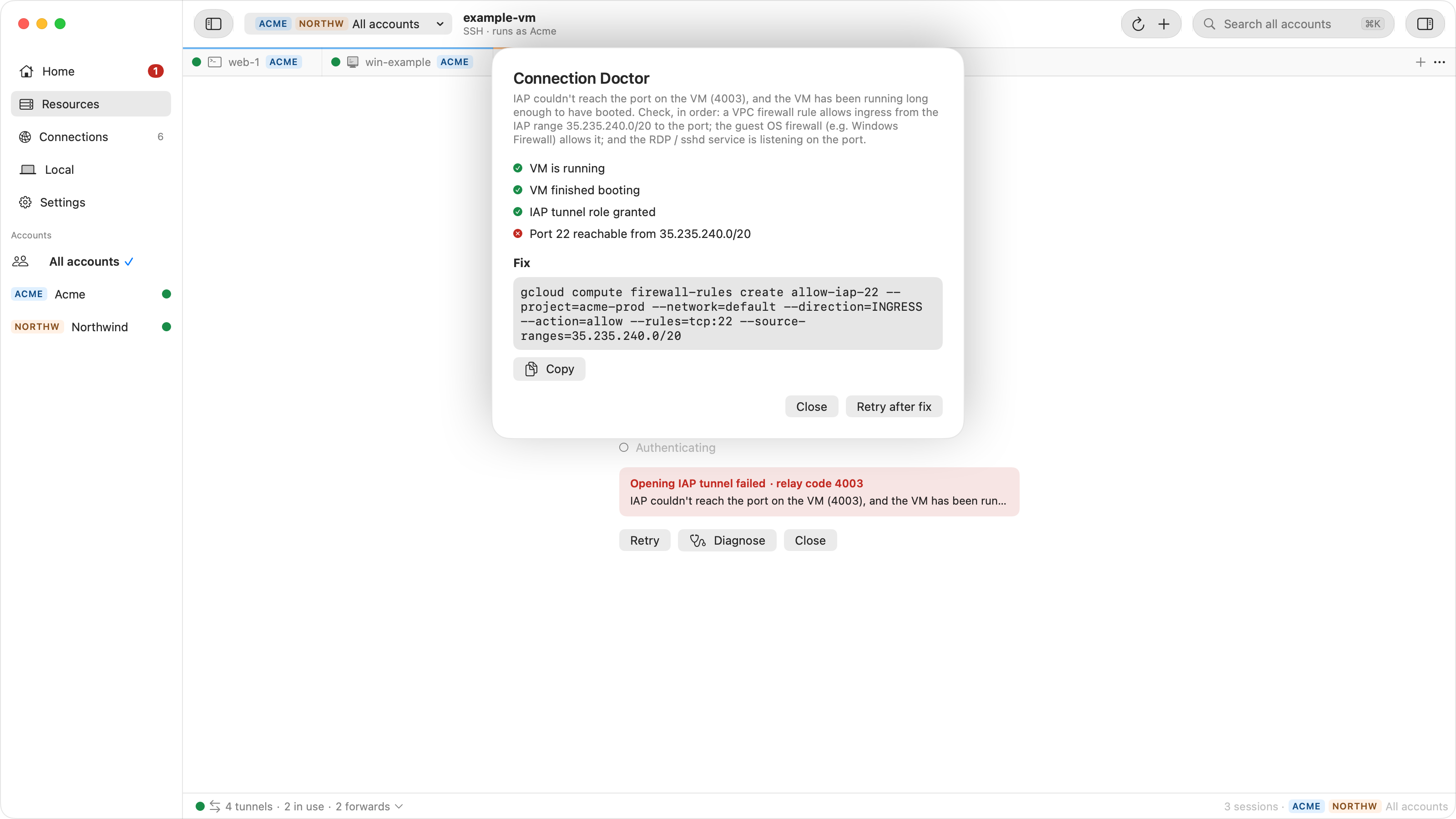
In Ostgate, a failed SSH or RDP tab has a Diagnose button that opens Connection Doctor. It reads the relay's close code and the instance's live status, and marks four checks as passed, failed or unknown:
- VM is running and VM finished booting, read back from Compute Engine. A VM started less than five minutes ago counts as possibly still booting.
- IAP tunnel role granted: fails on 4033. A 4003 passes it, because the relay accepted you.
- Port 22 reachable from 35.235.240.0/20 (or whichever port you used): fails on 4003.
From those it names one cause, such as Missing IAP tunnel role, No route to the VM port, VM still starting up or Instance not running, and offers the one command that fixes it, with Copy: the role grant, the firewall rule or the instance start, filled in with your project, instance, zone, port and account. Hand the command to whoever administers the project, or run it yourself if you do. Then click Retry after fix.
Ostgate itself needs no gcloud and no agent on the VM: it signs in with your
Google account and speaks the IAP relay protocol directly. The step-by-step setup is in the
docs.
Stop decoding close codes by hand. Ostgate is a native macOS app for SSH, RDP and TCP tunnels to Compute Engine through Identity-Aware Proxy, and it tells you which check failed and how to fix it.