Guide
Port forwarding to a GCP VM over IAP, from a Mac
A database, a cache or an admin web UI on a Compute Engine VM with no external
IP is still one command away from localhost on your Mac. Identity-Aware Proxy
can carry any TCP port, in two different ways. This guide shows both with
gcloud, when to pick which, and how Ostgate keeps the same tunnels running
without a terminal.
Updated
Two ways to forward a port through IAP
Both end with a port on 127.0.0.1 on your Mac, and both need
roles/iap. on the project or the VM. They differ in
what IAP connects to:
- A direct IAP tunnel goes from your Mac to one port on the VM's internal address,
for example
10.0.1.12:5432. Nothing else is involved. - An SSH local forward opens an SSH session to the VM through IAP and forwards a
port inside it, to anything the VM can reach: its own
localhost, another VM, Memorystore, an internal load balancer.
A direct IAP tunnel to a port on the VM
The VPC firewall must admit IAP's range on that port. For PostgreSQL:
gcloud compute firewall-rules create allow-iap-postgres \
    --project=acme-prod --network=default \
    --direction=INGRESS --action=allow \
    --rules=tcp:5432 --source-ranges=35.235.240.0/20
Then start the tunnel and leave it running:
gcloud compute start-iap-tunnel example-vm 5432 \
    --local-host-port=localhost:5432 \
    --zone=europe-west1-b --project=acme-prod
In another terminal, or in any database client:
psql "host=127.0.0.1 port=5432 user=postgres dbname=orders"
The same command works for Redis on 6379, MySQL on 3306 or a web UI on 8080: change the
port on both sides and open http://localhost:8080 for the web case. Without
--local-host-port, gcloud picks a free local port and prints it.
One catch: IAP connects to the VM's internal address, not to its loopback. PostgreSQL
(listen_addresses = 'localhost') and Redis (bind 127.0.0.1)
listen only on loopback by default, and then the tunnel fails with 4003 even
though the firewall is right. Either make the service listen on the internal address, or
use the SSH forward below.
An SSH local forward through IAP
This needs only port 22 open to 35.235.240.0/20, and a way to sign in over
SSH (OS Login or a metadata key). -N runs no remote command; -L
forwards the local port:
gcloud compute ssh example-vm --tunnel-through-iap \
    --zone=europe-west1-b --project=acme-prod \
    -- -N -L 5432:localhost:5432
Here localhost is the VM's own loopback, so a service bound to
127.0.0.1 works. Point the forward at another address and the VM becomes a
bastion, for example to a Memorystore for Redis instance at 10.20.0.3:
gcloud compute ssh example-bastion --tunnel-through-iap \
    --zone=europe-west1-b --project=acme-prod \
    -- -N -L 6379:10.20.0.3:6379
Several -L options can share one session. The Cloud SQL private IP guide uses the same
pattern for a database with no route from your laptop.
Which one to use
| You need | Direct IAP tunnel | SSH local forward |
|---|---|---|
| Firewall rule | The service's port | tcp:22 only |
| A service on the VM's loopback | No | Yes |
| Another host, Memorystore, an internal load balancer | No | Yes, anything the VM can reach |
| SSH access to the VM | Not needed | Needed (OS Login or a key) |
| A Windows VM without SSH | Yes | No |
Both run in a terminal you have to keep open, stop when the Mac sleeps or the network drops, and let any process on your Mac use the local port while they run.
How Ostgate does it
Ostgate is a native macOS app that opens both kinds of forward itself, with no
gcloud on your Mac.
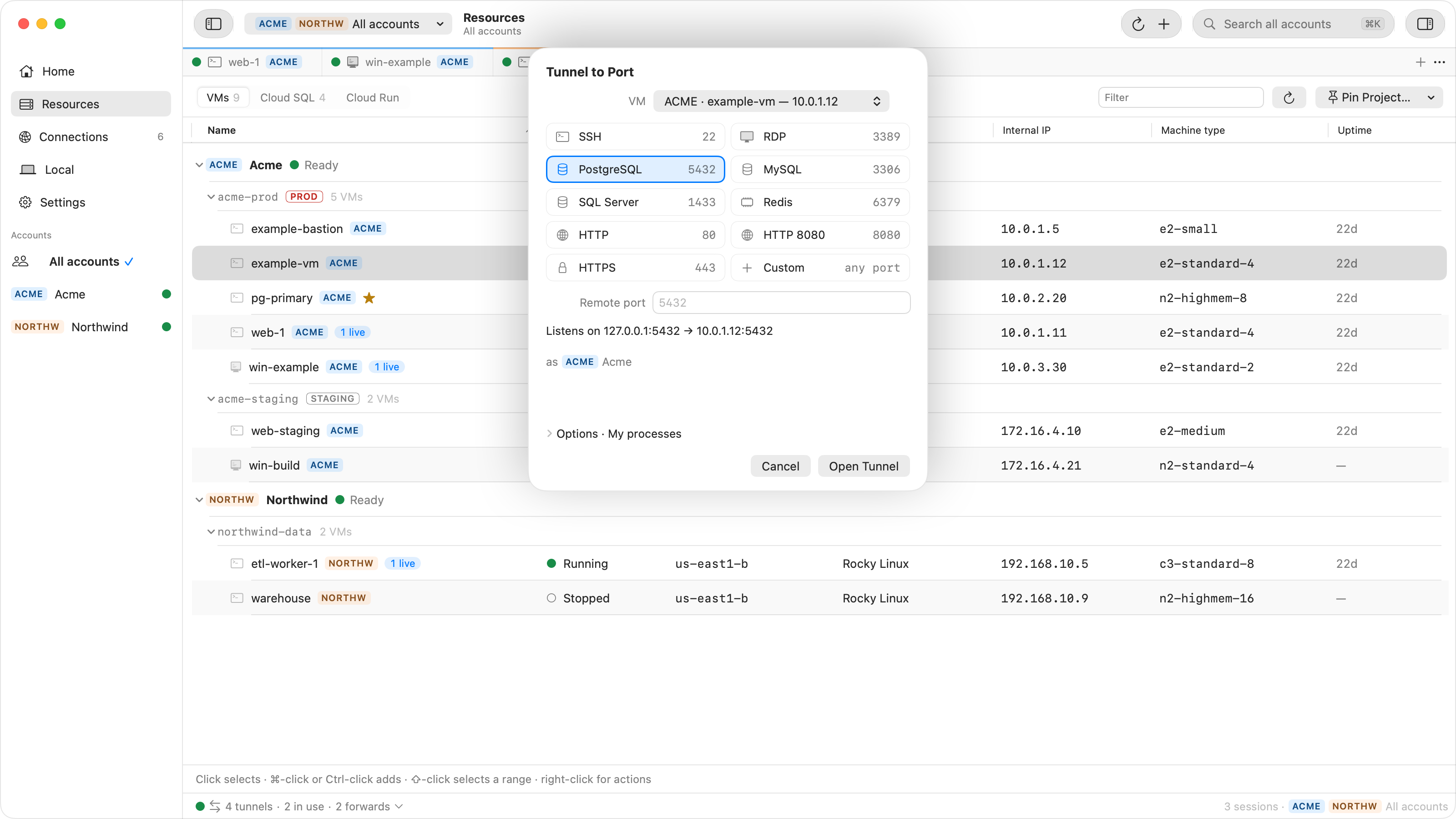
- Tunnel to Port… on an instance, or New Tunnel… (⌘T), opens a
direct IAP tunnel. Pick a preset (SSH, RDP, PostgreSQL, MySQL, SQL Server, Redis, HTTP,
HTTP 8080, HTTPS) or a custom port; the sheet shows exactly what will listen where, such
as
127.0.0.1:5432 → 10.0.1.12:5432. - Forward profiles (Connections › Forwards › New Forward Profile…) are the
SSH local forward: several ports over one SSH session through a VM you choose, to its
localhostor to any address it can reach. - Copy Command gives you the client line for the tunnel, such as the
psqlcommand with the right port.
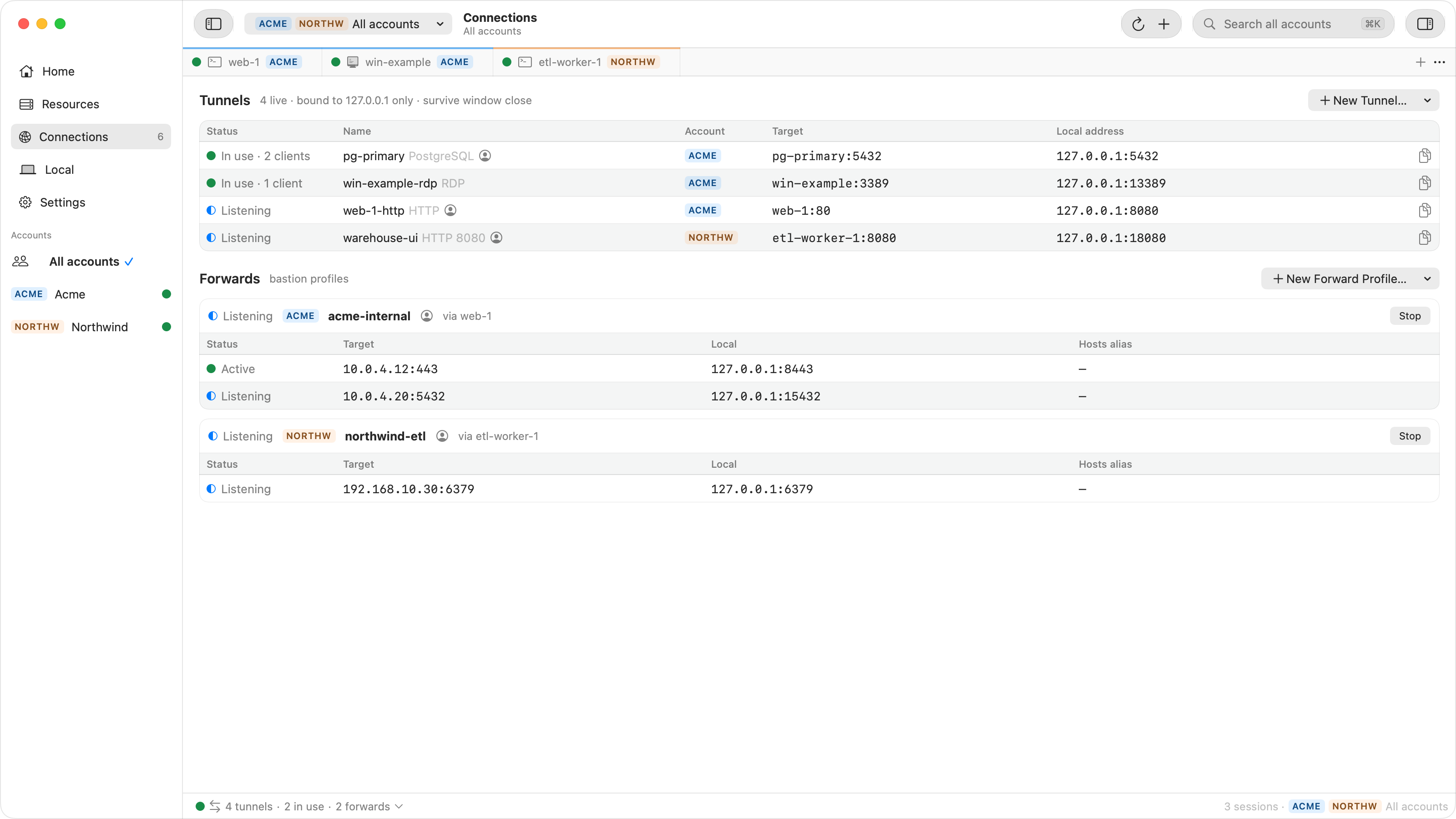
The local port stays the same from one run to the next, so saved connections in your database client keep working. Tunnels keep running when you close the window, reconnect by themselves after a network drop, can start automatically when their account opens, and are listed under Connections and in the menu bar.
Access decides which programs on your Mac may use a tunnel: Ostgate only,
My processes (any app running as your macOS user, the default for database and web
presets), or, after you confirm it, Any local process. Unlike a plain
start-iap-tunnel, other users' processes on the same Mac are refused by
default.
When it does not connect
| Symptom | Check |
|---|---|
Close code 4003, failed to connect to backend |
No firewall rule from 35.235.240.0/20 on that port, the service is
not running, or it listens only on the VM's 127.0.0.1. |
Close code 4033, not authorized |
The account lacks roles/iap.. |
| The local port is already in use | Something on your Mac already listens there, often a local PostgreSQL. Pick another local port, for example 15432. |
| SSH forward: the VM is reached, the target is not | The VM has no route to the target address, or the target's own firewall does not admit the VM. |
Every close code is explained in IAP tunnel errors, and the firewall and IAM settings in the IAP firewall rule and IAM checklist.
Questions
Which firewall rule does a port forward need?
A direct IAP tunnel to a port on the VM needs an ingress rule from 35.235.240.0/20 on that port, for example tcp:5432. An SSH local forward only needs tcp:22, because everything travels inside the SSH session.
Why does my tunnel fail with 4003 when the port is open?
The service on the VM probably listens only on 127.0.0.1. IAP connects to the VM's internal address, so a service bound to localhost refuses it. Either make the service listen on the internal address or use an SSH local forward to localhost on the VM.
Can I reach Memorystore or another private host this way?
Yes, with an SSH local forward through a VM that can route to it. A direct IAP tunnel only reaches ports on the VM itself.
Is the traffic encrypted?
Between your Mac and Google, IAP carries the connection over TLS. From Google to the VM it travels on Google's network to the VM's internal address. An SSH local forward adds SSH encryption end to end to the VM.
Keep your tunnels without a terminal. Ostgate runs on Apple Silicon Macs with macOS 26.3 or later, with a 7-day trial and no sign-up. Setup is in the tunnels and forwards docs.