macOS · Identity-Aware Proxy
IAP Desktop for Mac
Google's IAP Desktop only runs on Windows. Ostgate is a native macOS app that does the same job over the same Identity-Aware Proxy TCP forwarding: SSH terminals, Remote Desktop, SFTP and tunnels to Compute Engine VMs that have no public IP, from one window on your Mac.
Updated
What IAP Desktop is, and why Mac users go without it.
IAP Desktop is Google's free, open-source desktop client for Identity-Aware Proxy TCP forwarding. You sign in with your Google account, browse your projects and VM instances, and double-click one: IAP carries the connection to a VM with no external IP, so there is no bastion host and no VPN. It opens Remote Desktop and SSH sessions as tabs, manages tunnels to other ports, generates Windows credentials, and shows a VM's serial output and event log.
It is a Windows application, built on Windows' own Remote Desktop control, and there is no macOS version. Teams with a mix of Windows and Mac laptops end up with one good workflow and one improvised one.
What reaching a private VM from a Mac looks like today.
Without IAP Desktop, a Mac user installs the Google Cloud SDK and stitches three
tools together: gcloud to open the tunnel, a terminal to hold it open,
and Microsoft's Windows App (formerly Microsoft Remote Desktop) or an SSH client
pointed at a port on localhost. Every tunnel costs a terminal window,
every local port is picked by hand, and when a connection fails you get a closed
socket rather than the missing IAM role or firewall rule.
Today, with gcloud
$ gcloud compute start-iap-tunnel win-01 3389 \
    --local-host-port=localhost:13389 \
    --zone=europe-west1-b --project=acme-prod
# keep that running, then point Windows App at localhost:13389
Generate a Windows password in the Cloud Console, copy it into a second app, and repeat for every VM and every port.
With Ostgate
$ ssh web-01.europe-west1-b.acme-prod.gcp
Or double-click the instance: SSH for Linux, RDP for Windows, in a tab. Ports are allocated for you, credentials can be saved in the Keychain, and a failure names what to fix.
The IAP Desktop workflow, rebuilt for macOS.
Ostgate runs entirely on your Mac and calls Google's APIs as you. There is no
Ostgate server in the path of your connections, and it never reads or runs
gcloud.
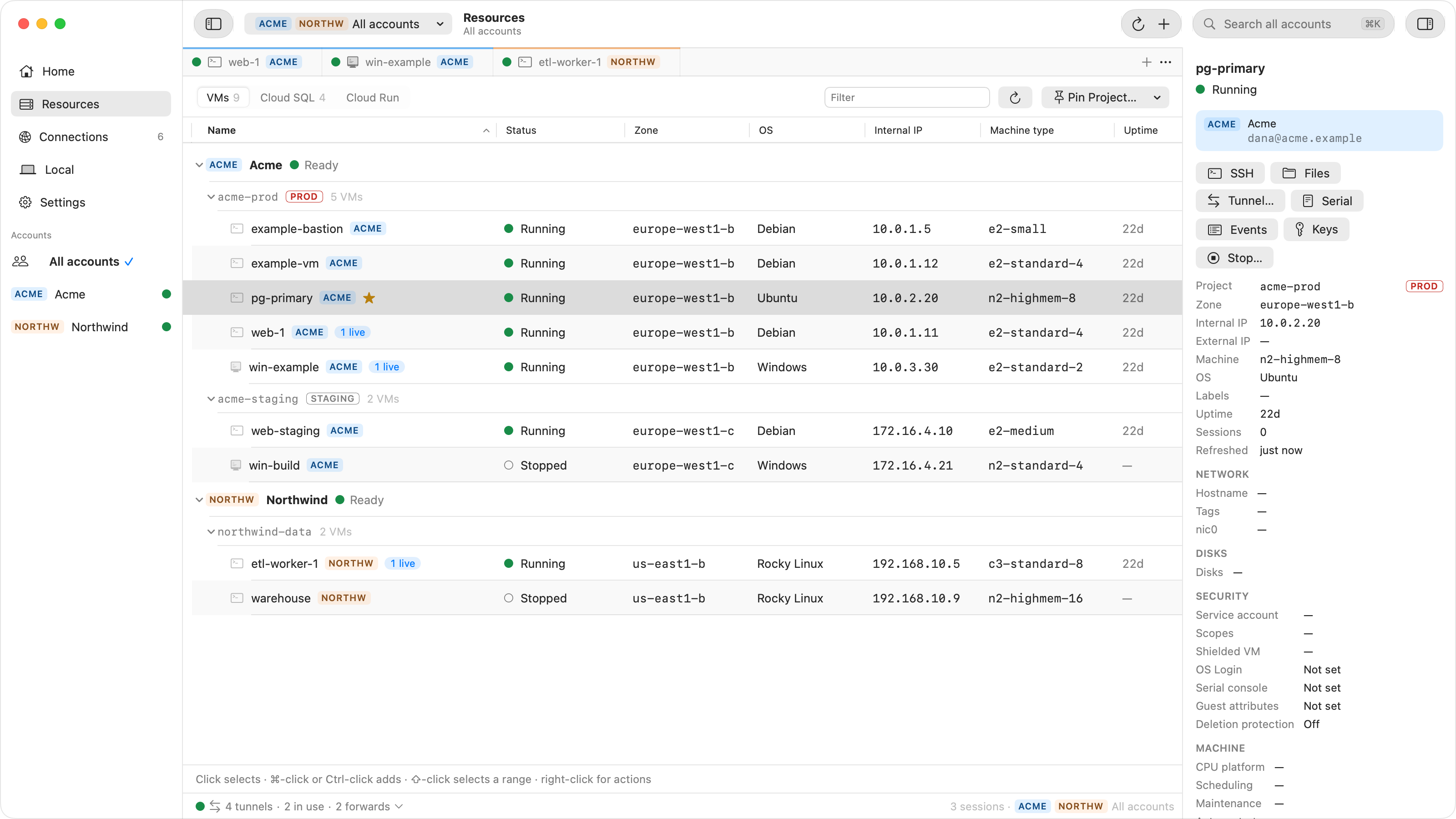
SSH terminals
A terminal tab per instance. Your key is generated on your Mac, in the Secure Enclave where available, and published through OS Login or instance metadata. Password or private-key-file sign-in covers appliances without OS Login.
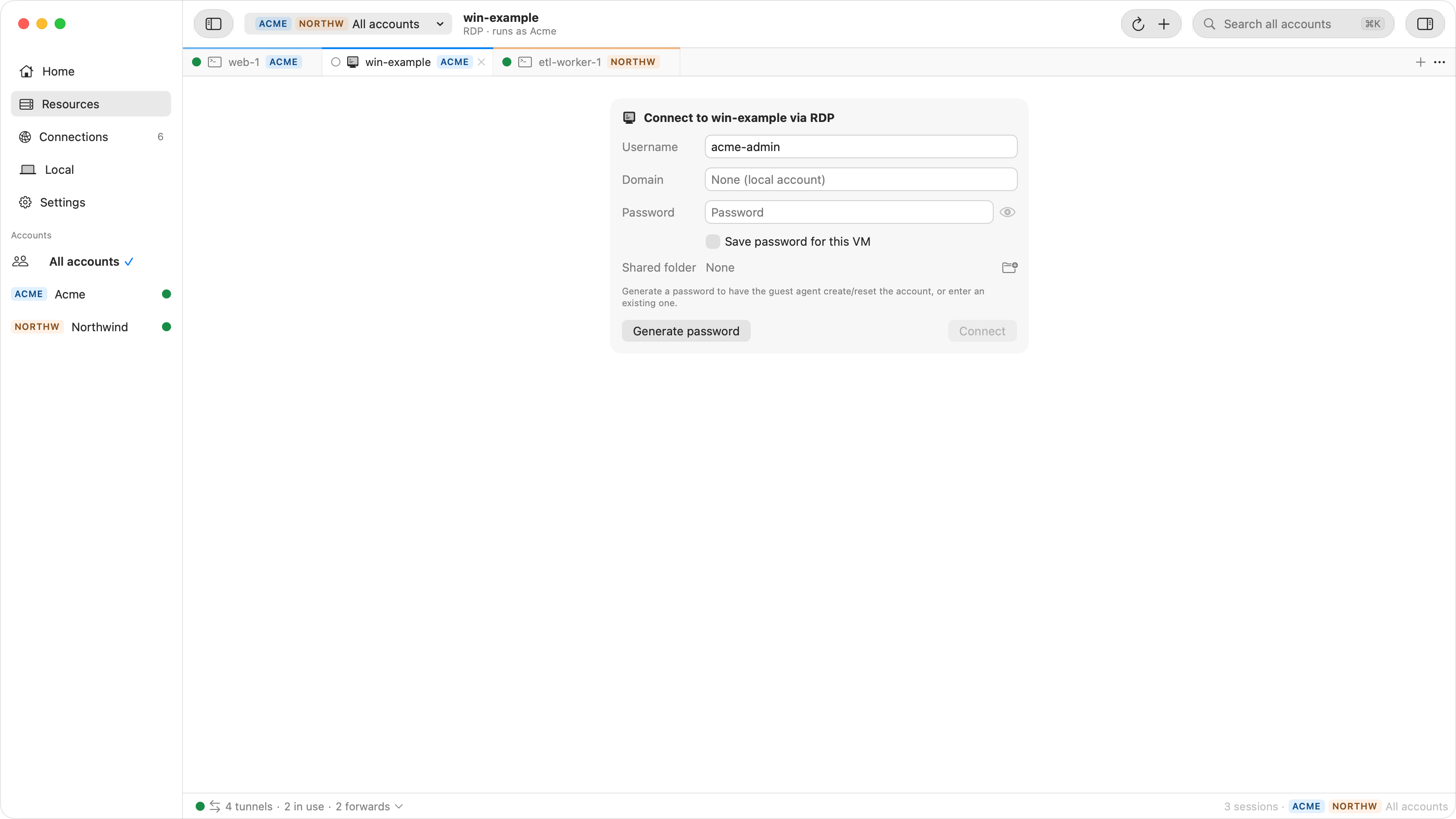
Remote Desktop
Windows desktops as tabs, with text clipboard sync, shared folders, resize that follows the window and Type Clipboard Text for login screens. Generate password in the credential form, or Set Windows Password… on the instance, creates or resets an account, and saved credentials sign you in automatically.
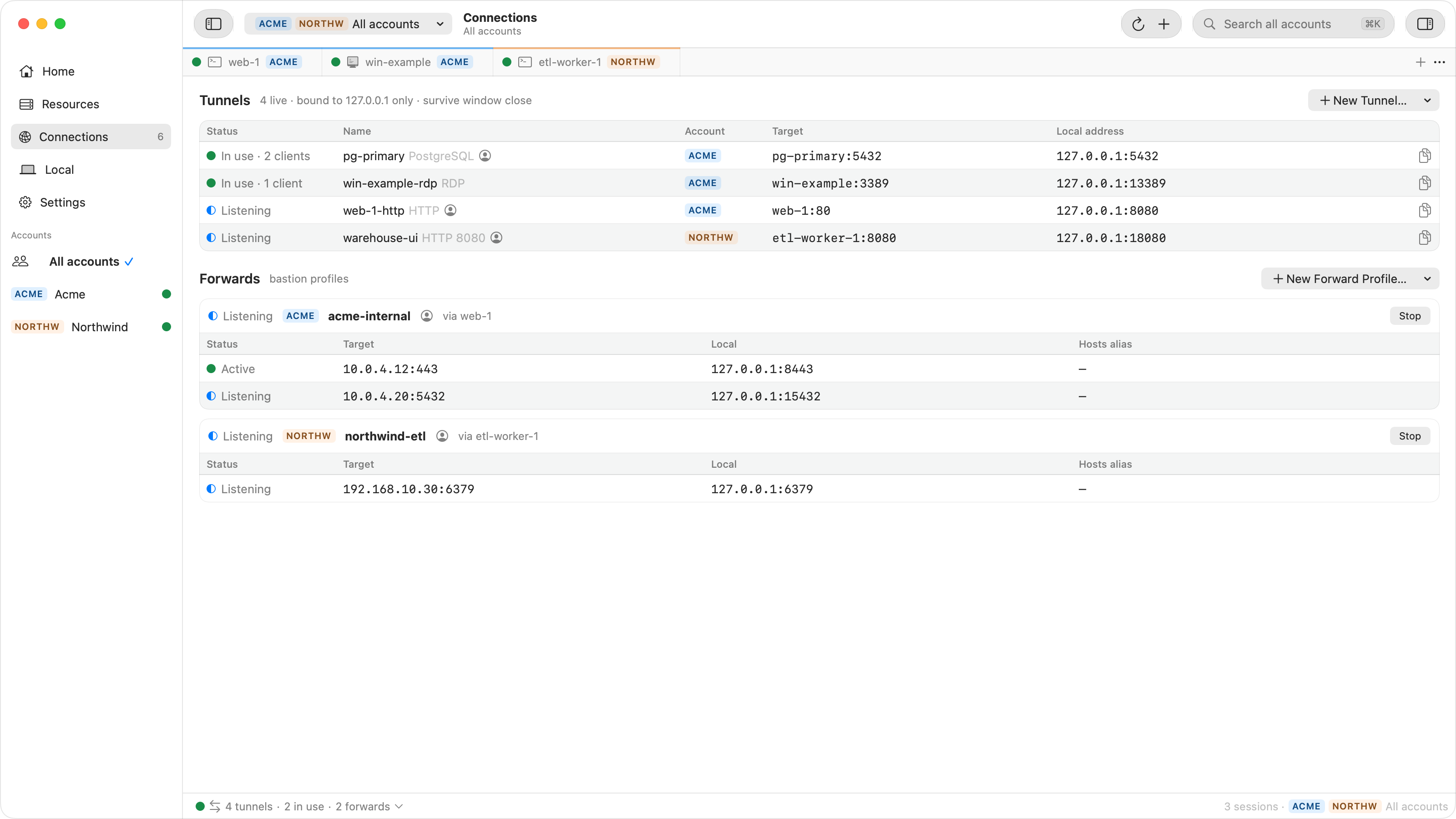
Tunnels to any port
Forward any VM port to 127.0.0.1, or start from a preset such as
PostgreSQL, MySQL, SQL Server or HTTP. Each keeps its local port between runs, and
Copy Command gives you the client line.
Files over SFTP
Browse Files opens a VM's file system in a tab. Drag files in to upload and out to Finder to download, or drop one on a terminal.
Serial output, event log, SSH keys
Read COM1, COM3 and COM4 for a VM that never reaches SSH, list its last 7 days of audit events, and see and delete the SSH keys that can sign in to it.
Settings that inherit
SSH and RDP options set once for an account, project, zone or VM, the narrowest winning field by field. Passwords stay in the Keychain or come from Secret Manager.
Ostgate and IAP Desktop, compared honestly.
Where IAP Desktop does something Ostgate does not, the table says so. It compares Ostgate 0.0.1 with IAP Desktop 2.50.
| Feature | IAP Desktop | Ostgate |
|---|---|---|
| Runs on | Windows | macOS 26.3+, Apple Silicon |
| Price and source | Free, open source | 7-day trial, then a licence key (pricing coming soon); closed source |
| Several Google accounts at once | Yes | Yes |
| SSH terminal tabs | Yes | Yes |
| SSH password sign-in | Yes, plus keyboard-interactive | Password only |
| SFTP file browser | Yes | Yes, files only; no folder transfers yet |
| Authorized SSH keys list | Yes | Yes |
| Embedded Remote Desktop | Yes | Yes |
| Windows password generation | Yes | Yes |
| RDP clipboard, shared drives, resize | Yes | Yes |
| RDP type clipboard text | Yes | Yes |
| RDP colour depth, resolution, NLA, admin session, Restricted Admin, audio | Yes | Yes |
| RDP microphone, printers, smart cards, COM and LPT ports, plug-and-play devices | Yes | No |
| RDP system-shortcut setting | Yes | No |
| Tunnels to any port, with presets and sticky local ports | Yes | Yes |
Launch a client app with the tunnel (.iapc files) | Yes | No; Copy Command gives the client line |
| Inherited connection settings | Yes | Yes |
| Connect over VPN or Interconnect instead of IAP | Yes | No, IAP only |
| Serial port output | Yes | Yes |
| Event log | Yes | Yes, per instance, last 7 days |
| Start and stop VMs | Yes | Yes |
| Cloud SQL | Through a Cloud SQL proxy VM | Through any running VM in the VPC, no proxy VM |
| Loopback access control per tunnel | Yes | Yes: Ostgate only, my processes, or any local process |
Open by iap-rdp:/// URL | Yes | No |
| Join a VM to Active Directory | Yes | No |
| Certificate-based access (mTLS) | Yes | No |
| Private Service Connect endpoint | Yes | No |
| Central policy management | Yes, group policies | No |
What Ostgate adds on a Mac. One click writes an
~/.ssh/config block, so ssh, scp and your IDE
reach any instance by name through IAP. Forward profiles carry several ports to
anything a chosen VM can route to over one SSH session, such as an internal load
balancer or a private database. Internal-only Cloud Run services open in your browser
through a local proxy, and Connection Doctor names the missing role or firewall rule
when a connection fails.
IAP Desktop alternatives on a Mac.
Without a Mac version of IAP Desktop, people reach private Compute Engine VMs from macOS in one of four ways. All but the third keep Google's Identity-Aware Proxy, which costs nothing for Compute Engine, and the IAM roles you already have.
| Approach | What you install | SSH and RDP | Tunnels |
|---|---|---|---|
| gcloud and a terminal | The Google Cloud CLI, plus a separate RDP client such as Windows App | gcloud compute ssh --tunnel-through-iap in Terminal; for RDP, a start-iap-tunnel left running and the RDP client pointed at localhost | One terminal window per tunnel, each local port picked by hand |
| Open-source GUI wrappers around gcloud | The Google Cloud CLI signed in with Application Default Credentials, plus the wrapper | Handed off to Terminal and to a separate RDP client | Start and stop gcloud tunnels from a window |
| Access products that replace IAP | An agent or connector in your VPC and a client on each Mac, usually per-user pricing | Through the product's own gateway instead of IAP | Through the product's own gateway |
| Ostgate | One app; no gcloud, nothing on your VMs | Built in: SSH tabs, an embedded Remote Desktop with Windows password generation, SFTP | Built in, with presets, sticky local ports and forwards to internal addresses |
From a Google Cloud project to a first connection.
If your project already works with IAP Desktop, skip the first step: the IAP setup is exactly the same.
- Prepare the project. Allow ingress from
35.235.240.0/20to ports 22, 3389 and any others, and grantroles/iap.. See Prepare your project.tunnelResourceAccessor - Install and sign in. Drag Ostgate to Applications and sign in with Google in your own browser. See Install and sign in.
- Pin projects and connect. Pin your projects in Resources, then double-click an instance. See Find your instances, SSH and Remote Desktop.
- Add tunnels and ssh. Forward other ports, or use
sshfrom Terminal. See Tunnels and forwards and Use ssh from Terminal.
Ostgate for macOS.
A disk image for Apple Silicon Macs running macOS 26.3 or later. Drag the app to Applications, launch it, and sign in with the Google account that already has access to your projects.
Version 0.0.1 · 30 September 2026 · signed and notarized by Apple
What people ask when they switch from IAP Desktop.
Is there a Mac version of IAP Desktop?
No. Google's IAP Desktop is a Windows application. On a Mac, the route Google
documents is the gcloud command line. Ostgate is a separate, native macOS
app that connects to the same VMs through the same Identity-Aware Proxy TCP
forwarding.
What are the alternatives to IAP Desktop on a Mac?
The gcloud command line with Terminal and a separate RDP client; open-source GUI wrappers that still need gcloud; access products that replace IAP with their own agents and gateway; or a native client such as Ostgate, which opens IAP tunnels itself and has SSH, Remote Desktop, SFTP and port tunnels built in.
Is Ostgate made by Google?
No. Ostgate is independent and is not affiliated with, endorsed by or sponsored by Google. It talks to Google's public APIs and to the IAP tunnel endpoint as the Google account you sign in with.
Do I need gcloud installed?
No. Ostgate signs in with your Google account in your own browser and opens IAP
tunnels itself. It never reads or runs gcloud, so you do not need the
Google Cloud SDK on your Mac.
Does my project need different setup than for IAP Desktop?
No. The setup is the same: a firewall rule that allows ingress from
35.235.240.0/20 to the ports you use, and
roles/iap. for each person who connects. Nothing is
installed on your VMs.
Can I keep using ssh, scp and my IDE?
Yes. One click in Settings adds a block to ~/.ssh/config, after which
ssh, scp and an IDE's remote session reach
INSTANCE.ZONE.PROJECT.gcp through IAP, with Ostgate's window closed.
Which Macs does Ostgate run on?
Apple Silicon Macs running macOS 26.3 or later. Intel Macs are not supported. Every Mac starts with a 7-day free trial, then needs a licence key.