Guide
IAP TCP forwarding: the firewall and IAM checklist
Identity-Aware Proxy can carry SSH, RDP or any TCP port to Compute Engine VMs
that have no external IP. It needs a short list of settings, above all a firewall rule for
the IAP IP range, 35.235.240.0/20, and the IAP-secured Tunnel User role. A
missing one fails in ways that look alike. This is the whole list, with the exact commands and console paths.
Updated
The checklist
The examples use the project acme-prod, the VPC network default,
the VM example-vm and the account alice@example.com.
- A VPC firewall rule allows ingress from
35.235.240.0/20to each port you use. - The account holds
roles/iap.on the project or the instance.tunnelResourceAccessor - The account can list instances and log in:
roles/compute.viewer, plus an OS Login role or the right to write instance metadata for SSH. - The Compute Engine API is enabled, and the Cloud OS Login API if you use OS Login.
- The VM is running, and something listens on the port inside it.
- Your own network lets the client reach
tunnel.cloudproxy.appover HTTPS.
1. The firewall rule for 35.235.240.0/20
IAP does not connect from your Mac's address. It connects to the VM's internal address from
its own range, 35.235.240.0/20, so that is the range the VPC firewall must
admit. Without the rule, IAP accepts your request and then cannot reach the port.
In the Cloud Console: VPC network › Firewall › Create firewall rule. Choose the VM's
network, direction Ingress, action Allow, targets (all instances in the
network, or a target tag), source IPv4 range 35.235.240.0/20, and the TCP
ports. From the command line:
gcloud compute firewall-rules create allow-iap-ingress \
    --project=acme-prod --network=default \
    --direction=INGRESS --action=allow \
    --rules=tcp:22,tcp:3389 \
    --source-ranges=35.235.240.0/20
To open the ports only on some VMs, add --target-tags=iap-ssh to the rule and
the same network tag to those instances. To see which rules already admit the range:
gcloud compute firewall-rules list --project=acme-prod \
    --filter="sourceRanges:35.235.240.0/20"
Two things can still block traffic that this rule allows: a deny rule with a higher priority (a lower number) in the same network, and a firewall inside the guest, such as Windows Firewall on port 3389. On a Shared VPC, the rule belongs in the host project that owns the network.
2. IAM roles
IAP checks the permission iap.tunnelInstances.accessViaIAP before it opens any
tunnel. The predefined role that carries it is
roles/iap., shown in the console as
IAP-secured Tunnel User; Project Owner has it too. Grant it on the project:
gcloud projects add-iam-policy-binding acme-prod \
    --member=user:alice@example.com \
    --role=roles/iap.tunnelResourceAccessor
or, for single instances, in the console under Security › Identity-Aware Proxy on the SSH and TCP resources tab. The tunnel role only opens the pipe. Depending on what you do through it, the account also needs:
| To | Grant |
|---|---|
| List instances and read their status | roles/compute.viewer |
| SSH to VMs with OS Login | roles/compute.osLogin or roles/compute.osAdminLogin, and
roles/iam.serviceAccountUser on the VM's service account |
| SSH to VMs without OS Login, or set a Windows password | roles/compute.instanceAdmin.v1 |
3. Narrowing access with IAM conditions
A role binding can carry an IAM condition, so the tunnel role applies only while the condition holds. A time-limited grant for a contractor looks like this:
gcloud projects add-iam-policy-binding acme-prod \
    --member=user:alice@example.com \
    --role=roles/iap.tunnelResourceAccessor \
    --condition='expression=request.time < timestamp("2026-12-31T00:00:00Z"),title=until-end-of-2026'
Google also documents condition attributes specific to IAP tunnels, such as the destination port, which lets you allow SSH but not RDP. Conditions are evaluated by Google when the tunnel opens, so a client never needs to know about them.
4. APIs
- Compute Engine API: always. Clients use it to find the instance and its zone.
- Cloud OS Login API: when instances use OS Login, to publish your SSH key.
The tunnel endpoint itself is not one of the APIs you enable in APIs & Services.
If your organisation's setup guide also enables the Cloud Identity-Aware Proxy API
(iap.googleapis.com), leave it on; Ostgate's setup does not list it, and
Connection Doctor does not check it.
5. Ports: 22, 3389 and custom
IAP forwards any TCP port the firewall rule admits. The common ones:
- 22 for SSH and SFTP.
- 3389 for Remote Desktop to Windows VMs.
- Custom ports, such as 5432 for PostgreSQL or 8080 for an internal web app. Add each
to the rule, for example
--rules=tcp:22,tcp:3389,tcp:5432.
If sshd or RDP listens on a non-standard port, the rule must name that port. In Ostgate,
set SSH port or RDP port in Settings › Connection Settings for the
instance, zone or project. IAP connects to the VM's first network interface,
nic0, by default.
6. Your own network
The client connects out to tunnel.cloudproxy.app over HTTPS (a secure
WebSocket), so a corporate proxy or egress filter must allow that host. Context-aware access
levels based on identity or location are evaluated by Google as usual; levels that require a
device certificate are not supported by Ostgate yet.
If the project sits inside a VPC Service Controls perimeter, the perimeter's own rules may also decide whether API calls from your Mac are admitted. Ostgate does not diagnose perimeter denials, so check those with whoever manages the perimeter.
How Ostgate's Connection Doctor checks it
When an SSH, RDP or tunnel connection fails in Ostgate, click Diagnose. Connection Doctor works from the answer IAP gave and a live read of the instance. It does not inspect your firewall rules or IAM policy directly.
| Row | How it is decided |
|---|---|
| VM is running | Read live from the instance's status. |
| VM finished booting | Passes once the VM has been up for five minutes. Fails when IAP could not reach a VM that started moments ago. |
| IAP tunnel role granted | Fails when IAP refuses the tunnel as not authorized (relay code 4033). Passes when IAP authorized the tunnel but could not reach the port. |
| Port reachable from 35.235.240.0/20 | Fails when IAP could not connect to the VM port (relay code 4003): a missing firewall rule, a guest firewall, or nothing listening. |
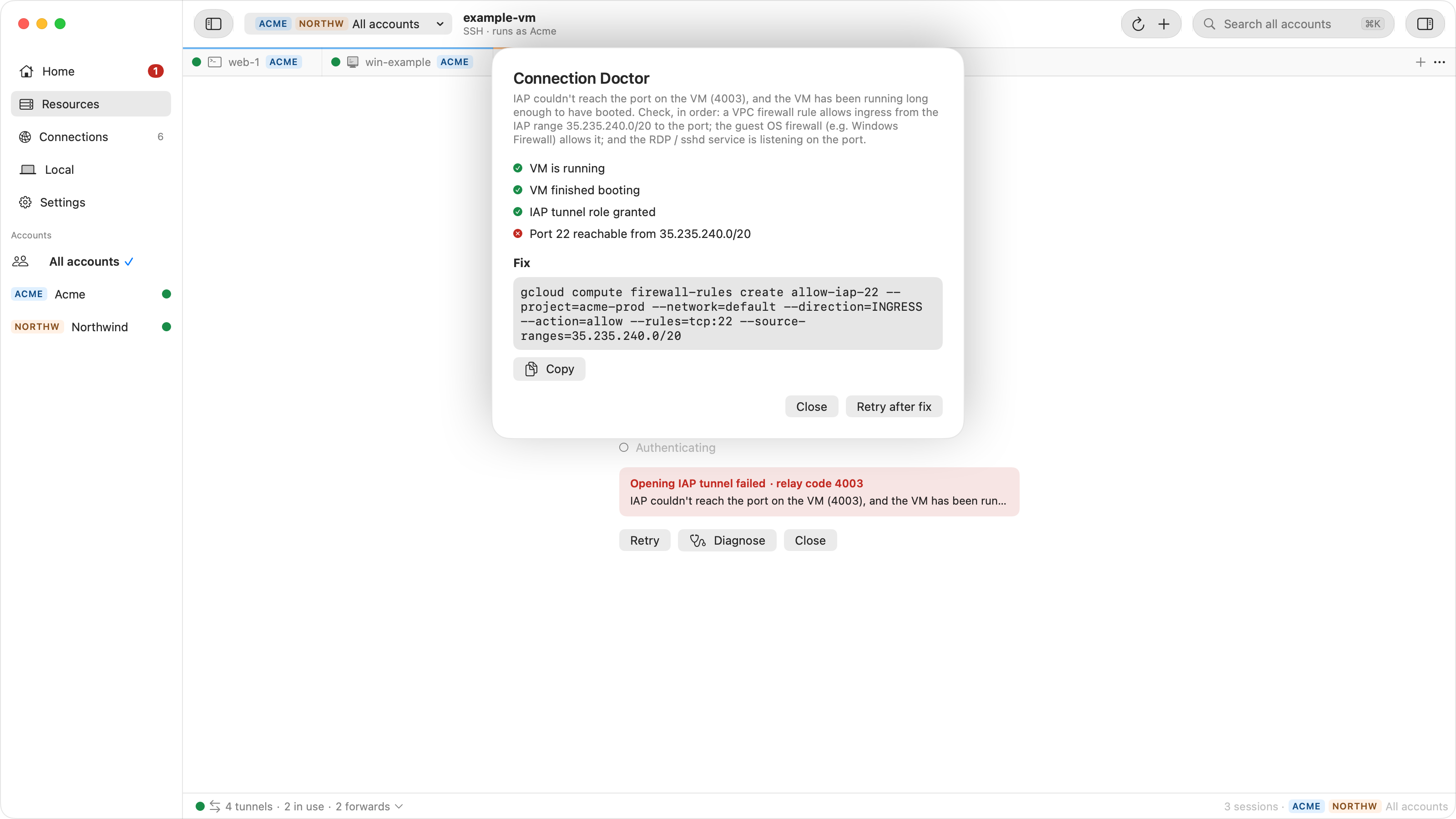
Extra rows appear for SSH key publication to instance metadata, a changed host key, and
rejected Windows credentials. A row Ostgate has no evidence for stays unknown rather than
guessing. Under Fix, the Doctor gives one command to Copy for your
administrator: the tunnel role grant, the Compute Instance Admin grant, a firewall rule for
that port (written for the default network), or starting the VM. After the fix,
Retry after fix reconnects. For the messages themselves, see the
IAP tunnel errors guide.
FAQ
What is 35.235.240.0/20?
The source range IAP uses when it connects to your VMs for TCP forwarding. A firewall rule must allow ingress from it to every port you reach through IAP.
Is the firewall rule a security risk?
No more than the ports it opens to IAP. Only IAP connects from that range, and IAP admits only accounts that hold the tunnel permission, so the rule does not expose the VM to the internet.
What is the IAP-secured Tunnel User role?
The console name of roles/iap.. It carries
iap.tunnelInstances.accessViaIAP, the permission IAP checks before opening a
tunnel.
Does IAP TCP forwarding work for RDP and databases?
Yes. It forwards any TCP port the rule admits: 22, 3389, or custom ports such as 5432.
Setting up SSH next? See SSH to a GCE VM without a public IP from a Mac.
Connect once the checklist is green. Ostgate opens SSH, RDP and tunnels through IAP from your Mac, with no gcloud to install. 7-day free trial, no sign-up.