Royal TSX with GCP VMs over IAP on a Mac
Royal Apps' developer has written on its forum that Royal TSX's Terminal
connections start the ssh client that comes with macOS, so a Google Cloud VM with
no external IP opens in one once ~/.ssh/config sends ssh through
Identity-Aware Proxy. Remote Desktop
and File Transfer connections ignore that file and need an IAP tunnel to a local port. This
guide sets up both with gcloud, shows how one tunnel to a bastion VM can serve
many connections through a Secure Gateway, and where Ostgate replaces
gcloud.
By Ostgate · Updated
What Royal TSX has for Google Cloud
Royal TSX has no Google Cloud integration. The Dynamic Folder samples in Royal Apps' toolbox repository include Amazon EC2, Azure virtual machines, Hetzner Cloud and IBM Softlayer, and none covers Compute Engine (checked 14 October 2026). It does have the parts a GCP setup is built from:
- Terminal connections, whose plugin Royal Apps describes as based on iTerm2, run the
sshthat comes with macOS. On Royal Apps' forum its developer wrote in 2018 that Royal TSX "is just using the OpenSSH client that comes with macOS", and a user of Royal TSX 26.0.3 reported in June 2026 that aProxyCommandin~/.ssh/configapplies to them. - Custom Terminal connections run any command in a terminal tab. The toolbox's EC2 sample for AWS Systems Manager uses one to start each session.
- A Secure Gateway carries Remote Desktop, VNC, SSH and Telnet connections over SSH port forwarding through another host.
Remote Desktop and File Transfer connections do not go through ssh. The same
forum report says the File Transfer engine "only offers SOCKS4/4a/5/HTTP" as proxies, so
those connections need an IAP tunnel to a local port.
The project needs a firewall rule from 35.235.240.0/20 to the VM's ports (22
for SSH and SFTP, 3389 for RDP) and roles/iap. for
your account; IAP TCP forwarding: firewall rule
and IAM has the commands.
SSH to a GCP VM in Royal TSX through IAP
Run gcloud compute ssh once so it creates
~/.ssh/google_compute_engine and publishes the public key, then add a host to
~/.ssh/config:
Host example-vm
    User alice_example_com
    IdentityFile ~/.ssh/google_compute_engine
    ProxyCommand /opt/homebrew/bin/gcloud compute start-iap-tunnel %h 22 --listen-on-stdin --zone=europe-west1-b --project=acme-prod
An app started from the Dock does not get your shell's PATH, so write gcloud's
full path; which gcloud prints it. Check the host in Terminal with ssh
example-vm. Then add a Terminal connection in Royal TSX with example-vm
as the computer name: Royal TSX starts ssh, ssh reads the block,
and gcloud carries the session through IAP.
A Custom Terminal connection is the other route. Its command can be gcloud compute ssh
example-vm --tunnel-through-iap --zone=europe-west1-b --project=acme-prod, which also
creates and publishes your key when needed.
RDP and SFTP in Royal TSX through a local port
For a Windows VM, open a tunnel to port 3389 and leave it running:
gcloud compute start-iap-tunnel example-vm 3389 \
    --local-host-port=localhost:13389 \
    --zone=europe-west1-b --project=acme-prod
Point a Royal TSX Remote Desktop connection at 127.0.0.1, port
13389. The VM has no default password; set or reset a Windows password first. For File
Transfer, a second tunnel to port 22 on localhost:2222 serves an SFTP connection
to 127.0.0.1, port 2222, with your VM username and private key.
One tunnel for many VMs: a Secure Gateway on bastion-1
VMs that share a VPC network can all go through one IAP tunnel. Open a tunnel to port 22 of
bastion-1 on localhost:2222, add a Secure Gateway with computer name
127.0.0.1, port 2222 and your bastion-1 login, and
select it on the connections to the other VMs, addressed by their internal IPs. Royal TSX then
forwards each connection over the SSH session to bastion-1. IAP needs the firewall
rule on tcp:22 to bastion-1 only; the VPC firewall must let
bastion-1 reach the other VMs' ports.
Royal TSX with Ostgate, without gcloud
Ostgate is a native macOS app that opens IAP tunnels itself, as the Google account you sign in with. It works with Royal TSX in two ways:
- SSH: in Settings › SSH Integration, click Install. Ostgate adds one managed
block to
~/.ssh/configwhoseProxyCommandcalls Ostgate by its full path, so a Royal TSX Terminal connection with the computer nameexample-vm.europe-west1-b.acme-prod.gcpgoes through IAP with Ostgate's window closed.sshsigns in with your own keys from~/.ssh, so your public key must be in your OS Login profile or the instance's or project's SSH keys. - RDP and File Transfer: Tunnel to Port… on the instance with the RDP or
SSH preset, and Access under Options set to My processes; the
default, Ostgate only, refuses Royal TSX. Point the connection at
127.0.0.1and the port the tunnel shows, which stays the same between runs.
Or open the VM in Ostgate itself. Double-click a Windows instance for an embedded Remote Desktop tab, where Generate password creates or resets the Windows account and saved credentials sign you in. A Linux instance opens an SSH tab, and Browse Files opens an SFTP browser.
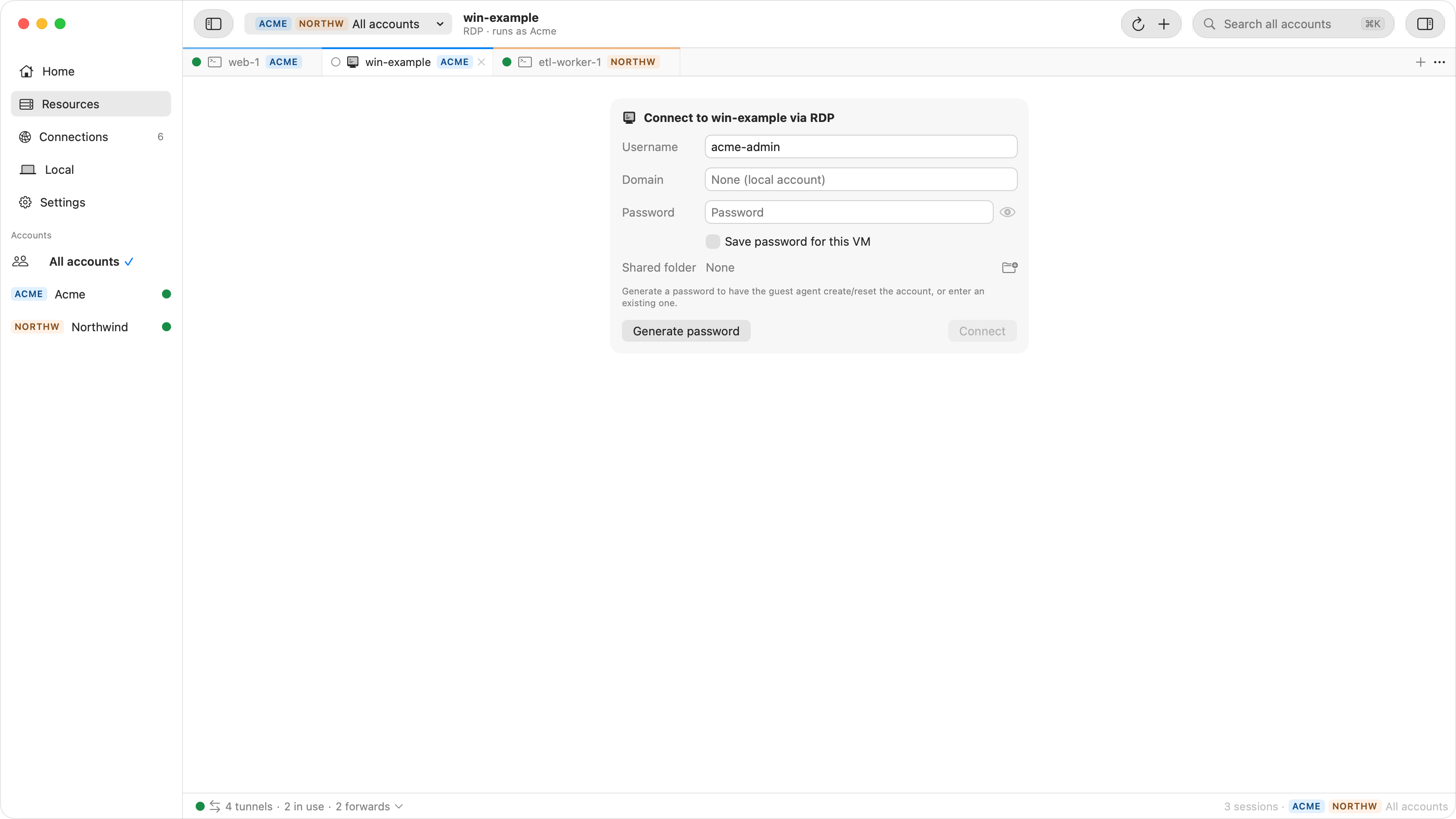
When a Royal TSX connection fails
| Symptom | Check |
|---|---|
| The Terminal connection closes at once | The ProxyCommand failed, often because gcloud is not
found from the Dock. Run ssh -v example-vm in Terminal to see why. |
RDP or File Transfer is refused on 127.0.0.1 |
The tunnel for that port is not running. |
File Transfer to example-vm times out |
File Transfer ignores ~/.ssh/config. Use a local tunnel. |
Tunnel closes with 4003 or 4033 |
The firewall rule for that port, or the IAP tunnel role; see IAP tunnel errors. |
| Remote Desktop rejects the password | See RDP errors on Compute Engine Windows VMs. |
| Refused … — only Ostgate may connect | The Ostgate tunnel's access setting turned Royal TSX away. Choose Change Access… on the notice and pick My processes. |
Questions
Does Royal TSX support Google Cloud IAP?
Not directly. According to Royal Apps' forum, its Terminal connections start the macOS ssh, so a ProxyCommand that runs gcloud compute start-iap-tunnel applies. Remote Desktop and File Transfer connections need an IAP tunnel to a local port.
Does Royal TSX read ~/.ssh/config?
Its Terminal connections do: Royal Apps' developer wrote on its forum that Royal TSX uses the OpenSSH client that comes with macOS. A June 2026 forum report says File Transfer connections do not, and offer only SOCKS and HTTP proxies.
Can a Royal TSX Dynamic Folder list my Compute Engine VMs?
A Dynamic Folder runs a script and reads the connections it prints, so a script around gcloud compute instances list could fill one. Royal Apps' samples include Amazon EC2, Azure virtual machines, Hetzner Cloud and IBM Softlayer, and none for Google Cloud.
Do I need gcloud on the Mac?
With the routes above, yes. With Ostgate, no: its SSH integration and its tunnels open IAP connections with your signed-in Google account.
Royal TSX connections to private VMs without gcloud. Ostgate runs on Apple Silicon Macs with macOS 15 or later, and is paid after a 7-day trial with no sign-up. See Use ssh from Terminal in the docs.