Set or reset a GCP Windows VM password from a Mac
A Windows VM on Compute Engine has no default password. You ask for one: the
Cloud Console's Set Windows password or gcloud compute
reset-windows-password creates the Windows account, or resets its password if it
exists, and shows you the new password. This guide covers how that request reaches the
VM, both manual routes, the permissions they need, and what to check when gcloud reports
"Did not receive password in a reasonable amount of time".
By Ostgate · Updated
How Windows passwords work on Compute Engine
Nobody sends a password to the VM. The client that asks for one, the Cloud Console or gcloud, works through the Compute Engine API:
- It generates a 2048-bit RSA key pair for this one request.
- It adds a JSON entry to the instance metadata key
windows-keys: theuserName, the public key'smodulusandexponent, youremail, andexpireOn, a UTC time five minutes after the request. - The guest agent on the VM sees the entry. It creates that account with a random
password, or sets a new random password if the account exists, encrypts the password
with the public key (RSA-OAEP), and writes a JSON line with
encryptedPasswordand themodulusto serial port 4. - The client reads serial port 4, finds the line whose modulus matches its key, and decrypts the password with the private key, which never left the client.
Because the guest agent does the work, the VM must be running and the agent must work.
Your Mac never connects to the VM for this: the request and the answer
go through instances. and
instances., so no firewall rule and no IAP tunnel
are involved until you connect over Remote Desktop.
Set it in the Cloud Console
In Compute Engine › VM instances, click the VM. Under Remote access, choose Set Windows password, enter the username and click Set, then copy the password it shows. The VM must be running.
gcloud compute
     reset-windows-password
The same flow from Terminal:
gcloud compute reset-windows-password win-01 \
    --user=alice \
    --zone=europe-west1-b --project=acme-prod
- If
alicedoes not exist, the agent creates it and gcloud prints its password. If it exists, its password is replaced. gcloud first asksWould you like to set or reset the password for [alice];--quietskips the question. - Without
--user, gcloud uses the part of your account email before the@, lowercased, with other characters replaced by_. The username must differ from the instance name. - gcloud prints
username,passwordandip_address, the VM's external IP. On a VM without one it warns that the instance "does not appear to have an external IP address"; that warning does not matter when you connect through IAP. - gcloud warns that resetting an existing account's password "can cause the LOSS OF ENCRYPTED DATA secured with the current password, including files and stored passwords".
- On a Mac, gcloud generates the key pair with the
opensslon yourPATH; macOS ships one at/usr/bin/openssl.
Every run is a new reset. A password a colleague copied an hour ago stops working when you run it again for the same user.
Permissions it needs
Google's documentation lists two roles:
| Role | On | When |
|---|---|---|
roles/compute. |
The VM or project | Always |
roles/iam. |
The VM's service account or the project | If the VM runs as a service account |
The write the flow depends on is the metadata update,
compute.instances.. Connecting afterwards also needs
roles/iap. and a firewall rule for tcp:3389; see
RDP to a Windows VM on Google Cloud from a
Mac.
When no password comes back
gcloud reads serial port 4 every 2 seconds and gives up after 30 seconds. What it says tells you how far the agent got:
- "The instance may not be ready for use" means serial port 4 had no output from the agent at all. gcloud's message names two causes: the instance was created recently, or it is not running Windows. Wait a few minutes after creation and try again. Google's documentation adds that an imported VM needs COM4 enabled in Windows Device Manager.
- "Did not receive password in a reasonable amount of time" means the agent is
present but no answer for your key arrived within 30 seconds. The message asks you to
"confirm that the clock on your local system is correct", because the entry's
expireOnis computed from your Mac's clock: five minutes after the time it shows. Check the Mac's time, then run the command again; each run sends a new key. - "This Windows instance appears to be too old" means the metadata still holds the
legacy keys
gce-initial-andwindows-user gce-initial-and the agent does not answerwindows-password windows-keys. gcloud suggests recreating the instance from a current image.
Google's documentation lists the prerequisites as a VM that is online and ready and a
functional Windows guest agent. To see what the agent wrote, including an
errorMessage field when it failed, read port 4 yourself:
gcloud compute instances get-serial-port-output win-01 \
    --port=4 --zone=europe-west1-b --project=acme-prod
Without --port the command reads port 1. If the password arrives but Remote
Desktop rejects it, go to "The user
name or password is incorrect" in the RDP errors guide.
Domain controllers and domain-joined VMs
- On a domain-joined VM, the command creates or resets a local account. Your
domain accounts sign in as
DOMAIN\userwith the domain's password. - On a domain controller, the command cannot create a local user. It creates a domain user, or resets an existing domain user's password. gcloud's help says a user created this way is added to the built-in administrators group of the domain controller, and recommends Active Directory Users and Computers if that is not what you want. Google's documentation warns about the same reset of an existing domain user.
Where the password travels
- The password exists in clear text only on the VM and in the client that asked for it. Serial port 4 carries it encrypted to a key only that client holds, so anyone else who can read the VM's serial output cannot use it.
- A
windows-keysentry contains your email, the username and the public key. The entry is a request that carries no secret, and it expires five minutes after it is written. Before adding a new entry, gcloud drops expired ones and, if the value is still over 256 KB, the oldest. - gcloud prints the password in your Terminal, so it stays in the scrollback until you clear it.
How Ostgate does it
Ostgate is a native macOS app with Remote Desktop built in. It runs the same
windows-keys flow itself: it generates the RSA-2048 key in the app, reads
serial port 4 and decrypts the answer with macOS's own security framework, with no
gcloud and no openssl involved.
- Set Windows Password… appears in the menu of a running Windows instance. It asks
first: "Reset the Windows password for win-01?", with the Google account and project
the reset runs in, and a username field filled in with the Windows user from the
instance's connection settings, or
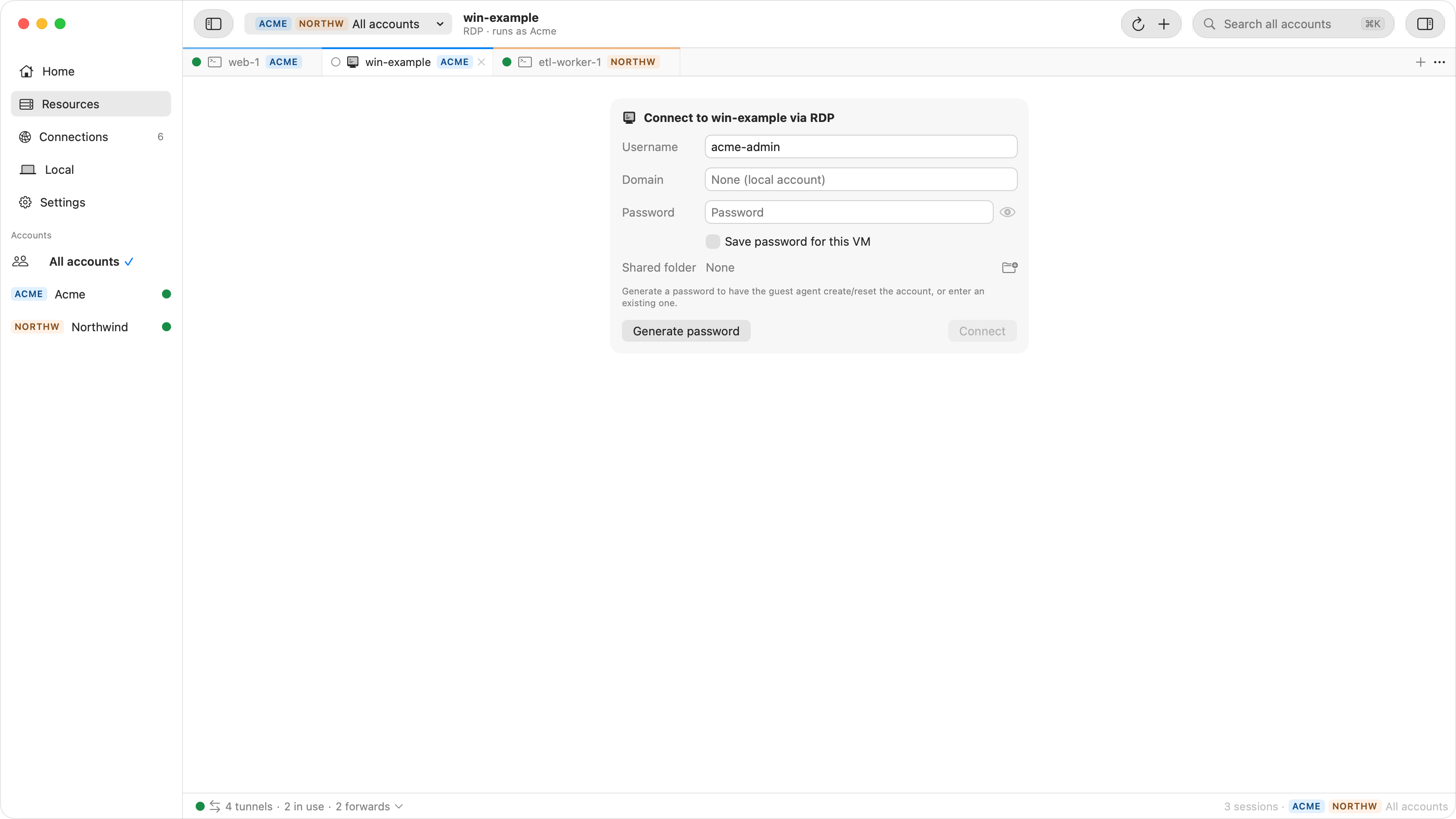
adminwhen none is set. It explains that an existing account's password is replaced and that otherwise the guest agent creates the account as a local administrator. Nothing happens until you click Reset Password. - While it runs, the sheet says the guest agent "creates or resets the account; this can take a minute". Ostgate reads serial port 4 up to 30 times, 2 seconds apart.
- The result shows the username and the password, hidden until you show or copy it, with "Copy this now — it isn't stored unless you save it for this VM." Save for this VM puts it in the macOS Keychain, so Connect via RDP signs in by itself.
- In an RDP tab, Generate Password in the credential form asks the same question and fills the new password into the form.
- After you sign in with a password you typed, a bar over the desktop asks "Save this password for win-01? Save only once you are signed in to the desktop." with Not Now and Save.
- A missing permission names the account, the project and the permission, in the form "… can't reset Windows passwords in acme-prod (needs …)".
A saved Windows password is a Keychain item under that Google account's profile, readable only on this Mac after first unlock and never synchronized, and it is read only when a connection starts. A saved password that Windows rejects is not tried again automatically, so retries cannot lock the account. A password can also come from Google Secret Manager instead; Ostgate then keeps only the secret's name.
Messages and fixes
| Message | Cause | Fix |
|---|---|---|
| Did not receive password in a reasonable amount of time | The agent did not answer your key within 30 seconds, or your clock is off. | Check the Mac's time, read serial port 4, run it again. |
| The instance may not be ready for use | No agent output on serial port 4: still booting, or not Windows. | Wait a few minutes; on an imported VM, enable COM4. |
| This Windows instance appears to be too old | Legacy gce-initial- metadata and an agent without windows-keys. |
Recreate the VM from a current image. |
| User [win-01] cannot be created on instance [win-01] | The username equals the instance name. | Pass another --user. |
| Permission denied (403) on the metadata update | No compute.instances.. |
Grant roles/compute.. |
| Does not appear to have an external IP address | A warning: the VM has only an internal IP. | None needed when you connect through IAP. |
| The user name or password is incorrect | The password was reset again since you copied it, or the account was not created yet. | See RDP errors. |
Questions
What is the default password of a Windows VM on Google Cloud?
There is none. You generate one: Set Windows password on the VM's details page in the Cloud Console, or gcloud compute reset-windows-password. The guest agent on the VM creates the account or resets its password and returns the new password encrypted to your client.
Does gcloud compute reset-windows-password delete files?
No, but on an existing account it can make data encrypted with the old password unreadable. gcloud warns that the reset can cause the loss of encrypted data secured with the current password, including files and stored passwords. A new account has nothing to lose.
Why does gcloud say "Did not receive password in a reasonable amount of time"?
The guest agent did not write an answer for your key to serial port 4 within 30 seconds. Check that your Mac's clock is right, since the request expires five minutes after the time it shows, then run the command again. Reading serial port 4 shows any error the agent reported.
What is the root or sudo password on a GCP Linux VM?
Root has none: on Google-provided images the root account has no password, and root login with a password over SSH is off by default. Google recommends running commands through sudo instead of enabling root login. With OS Login, roles/compute.osAdminLogin grants login with sudo and roles/compute.osLogin grants login without it.
Windows passwords without gcloud. Ostgate runs on Apple Silicon Macs with macOS 26.3 or later, with a 7-day trial and no sign-up. Setup is in the Remote Desktop docs.