macOS · Google Kubernetes Engine
GKE clusters on a Mac, without gcloud
Ostgate is a native macOS app that lists the GKE clusters of all your Google
accounts, signs kubectl in to them without gcloud or gke-gcloud-auth-plugin,
and reaches private control planes through the DNS endpoint, the Connect gateway, a VPN or
a bastion VM over IAP.
Updated
kubectl on GKE today needs gcloud
kubectl signs in to GKE through gke-gcloud-auth-plugin,
which ships with the Google Cloud SDK and by default asks gcloud for a token. So the usual
route on a Mac is the SDK, the plugin and a get-credentials per cluster. It gets
harder with several
Google accounts, with clusters whose control plane has only a private address, and with
tools started from the Dock, which do not see your shell's PATH. The guide
kubectl to a private GKE cluster from a
Mac walks through the paths to a private cluster, and
kubectl for GKE without gcloud on a Mac
through the sign-in routes that skip gcloud.
Today, with gcloud
$ gcloud container clusters get-credentials acme-prod-gke \
    --dns-endpoint --location=europe-west1 --project=acme-prod
$ kubectl get namespaces
Needs the SDK and the auth plugin on the Mac, and one gcloud account active at a time.
With Ostgate
$ kubectl --context ostgate-acme-prod-acme-prod-gke get namespaces
After Use with kubectl… on the cluster. kubectl gets its token from Ostgate, for whichever account the context belongs to.
kubectl, k9s and other tools sign in through Ostgate
Use with kubectl… on a cluster writes a context to ~/.kube/ostgate, a
kubeconfig file Ostgate owns, and leaves ~/.kube/config alone. The context's
sign-in command is Ostgate itself: when kubectl needs a token, it runs Ostgate, which
hands it a short-lived token of that account. No token is written to the file. k9s and
other tools that read a kubeconfig use the same contexts. They sign in even when Ostgate is
not running, except on the bastion path, whose forward runs in the app.
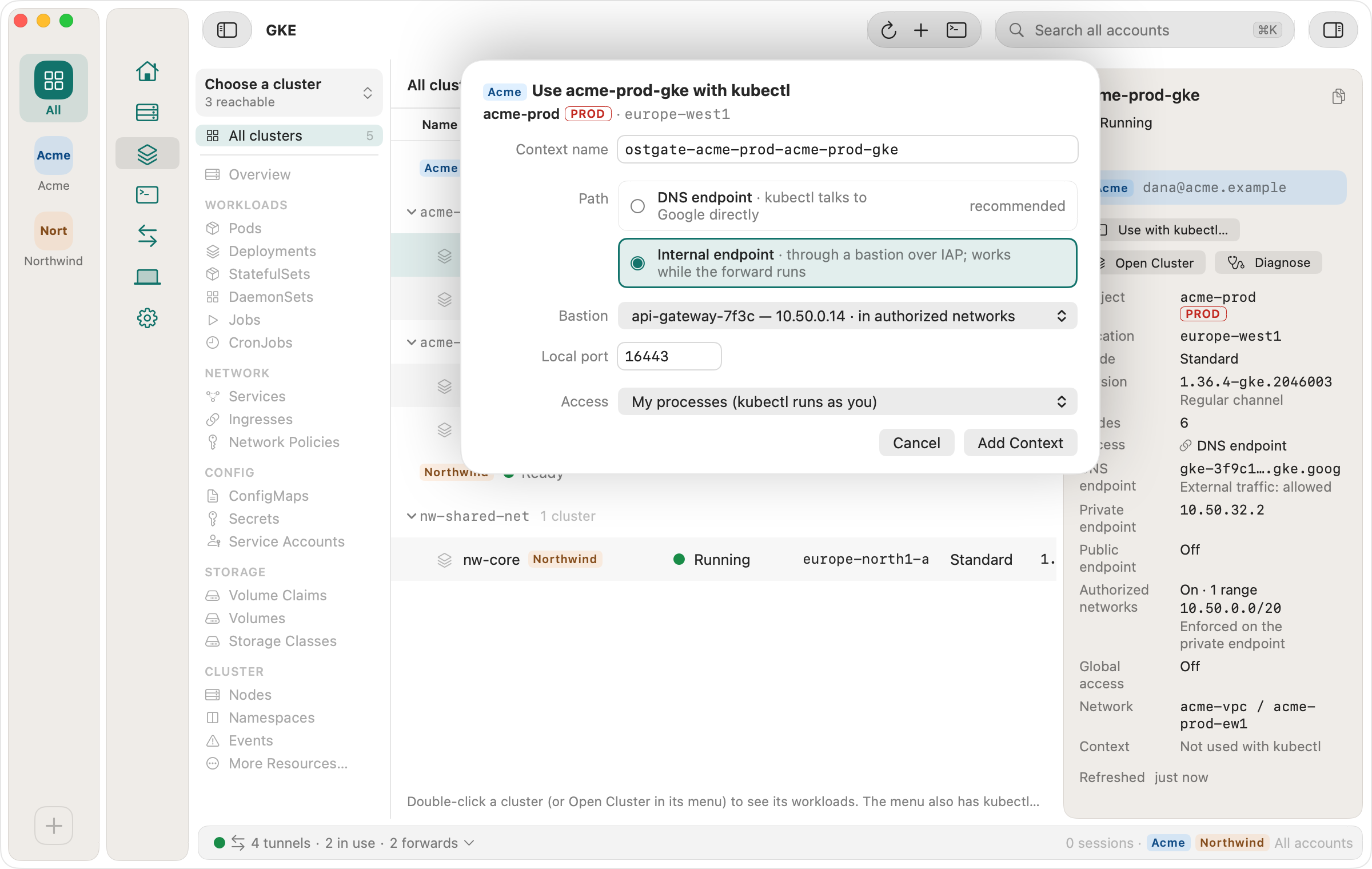
Private control planes
Ostgate reads each cluster's endpoint settings and picks a path: the DNS endpoint when it allows external traffic, the Connect gateway for a cluster in a fleet, the internal endpoint over your VPN, or the internal endpoint through a bastion VM in one of your projects, carried over IAP. For the bastion path it marks which VMs the cluster's authorized networks admit and starts the forward kubectl needs. When a cluster does not answer, Diagnose Access… checks the endpoint settings, the bastion's region and subnet, authorized networks and your permissions, and names the failing one; for a cluster setting or a missing IAM role it adds the command a project admin can run to fix it. The guide kubectl times out on a GKE cluster lists the same checks with the errors kubectl prints.
Every cluster of every account
The GKE area lists the clusters of all pinned projects of all signed-in Google accounts, each row tagged with its account. Open one to browse pods, Deployments, StatefulSets, DaemonSets, Jobs, Services, Ingresses, Network Policies, ConfigMaps, Secrets, volumes, nodes, namespaces and events. CPU, memory and volume use come from the system metrics GKE sends to Cloud Monitoring; Ostgate installs nothing in the cluster. GPU nodes show how busy their GPUs are, and vLLM model servers show their model, port and the Secret that holds their API key. Which pods use this ConfigMap or Secret? shows the kubectl route to what a ConfigMap's Used by lists, and which pods need a restart after a change.
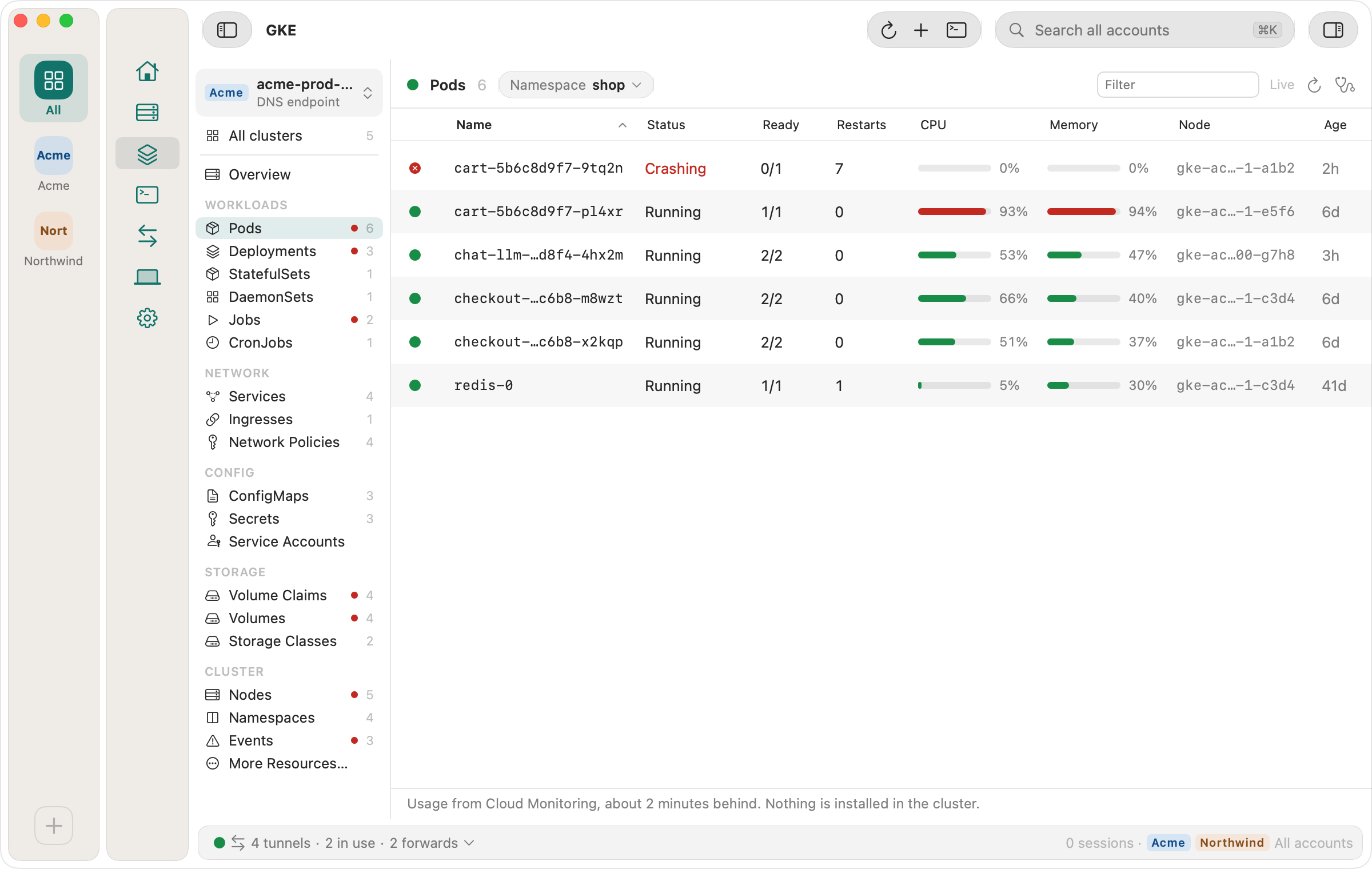
Security findings, cost and identity
A cluster's Overview counts its security findings as Risk, Not checked and Mitigated and opens them in a tab, each with why it matters and how to fix it. A pod shows which Google identity it runs as and the first broken link of its Workload Identity chain, and a Service, Ingress or Gateway its traffic path down to each pod. GKE clusters in the docs has the details.
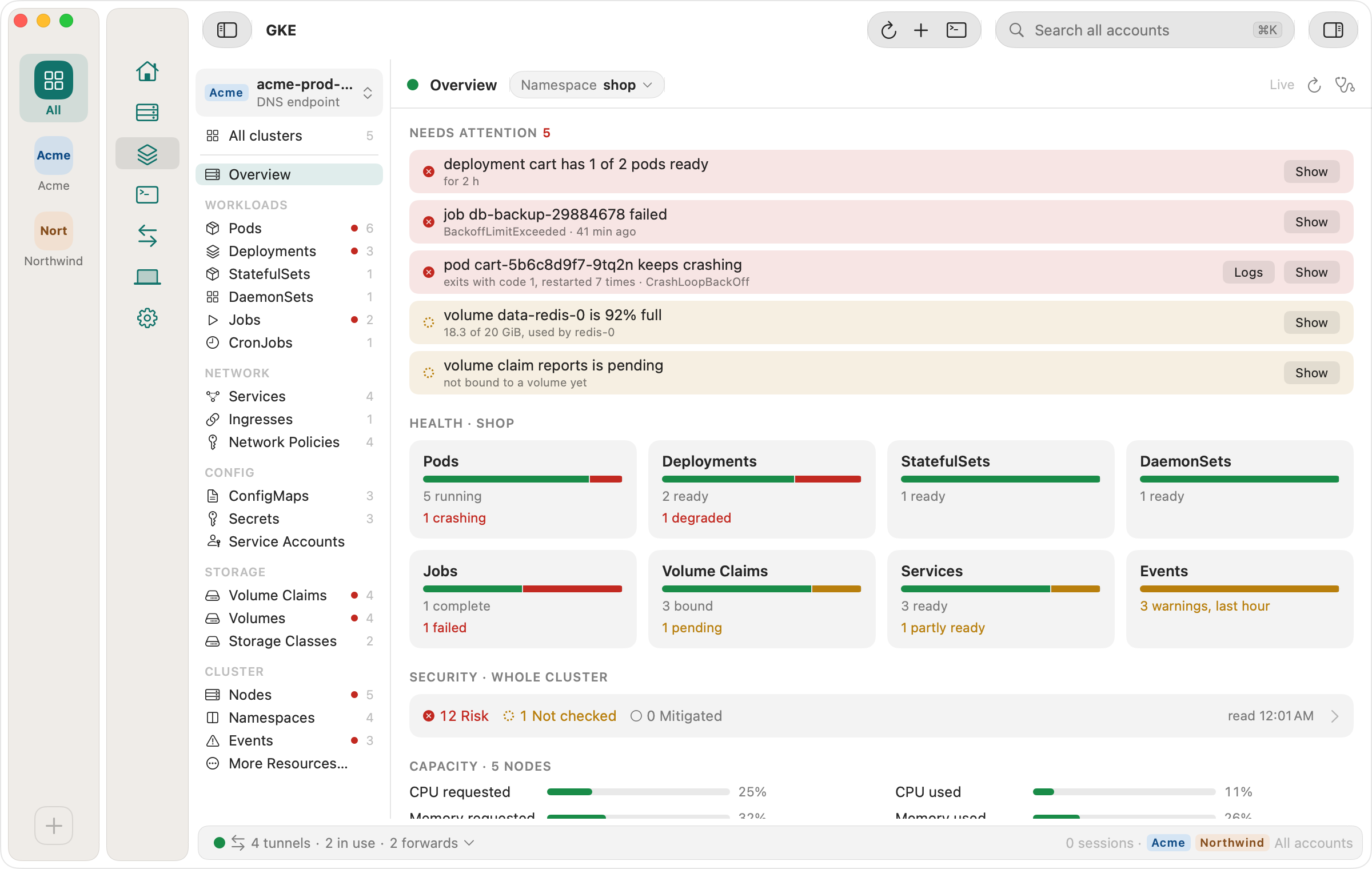
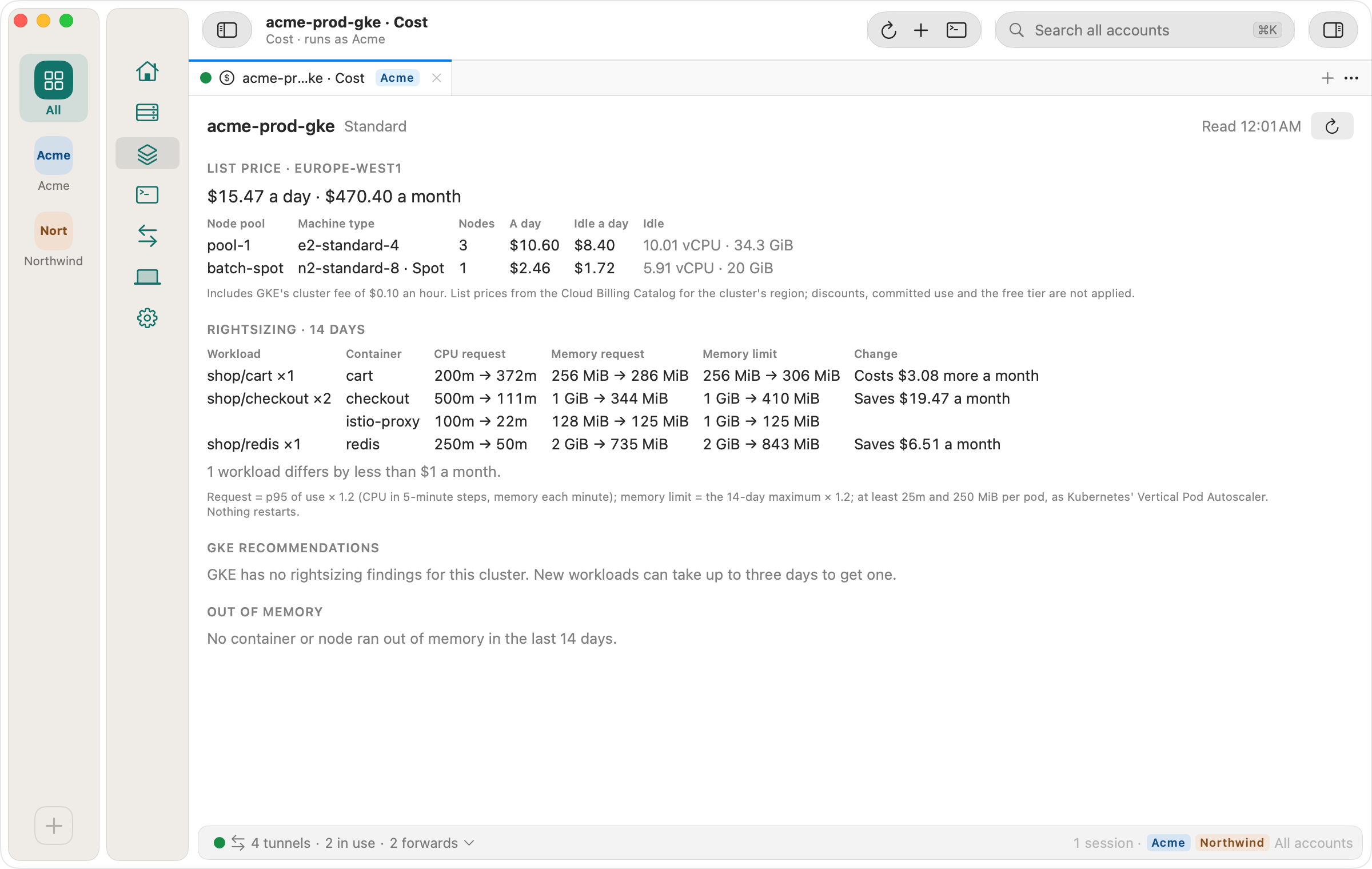
Open Cost on the Overview prices the cluster at today's list prices from Google's catalog, per node pool on Standard or by pod requests on Autopilot. RIGHTSIZING suggests requests and memory limits from 14 days of use and says what each change saves or costs a month.
Port-forwards that outlive a pod, and logs
Forward Port… on a Service keeps listening while its pods are replaced and sends
each new connection to a ready pod. With the Ostgate port helper the forward can answer
on the Service's own name, such as checkout., so the
same URL works on your Mac and in the cluster. A pod's log opens in a tab that follows
it, searches it and reconnects after a drop without repeating lines. Restart a
Deployment, StatefulSet or DaemonSet, or delete a pod, after a confirmation that names the
account, project, cluster and namespace. Port-forward
to a GKE Service that survives pod restarts compares this with
kubectl port-forward.
A shell in any container, like kubectl exec into a pod
With kubectl, a shell in a pod is kubectl exec. In a pod with more than one
container, -c names the container; without it, kubectl uses the container
that the pod's kubectl.kubernetes.io/default-container annotation names.
kubectl auth can-i asks the cluster beforehand whether your account may:
kubectl auth can-i get pods \
    --subresource=exec -n shop
kubectl auth can-i create pods \
    --subresource=exec -n shop
kubectl exec -it checkout-7d9f8 \
    -c app -n shop -- /bin/sh
An image without a shell, such as a distroless one, fails with
executable file not found in $PATH for sh, or
stat /bin/sh: no such file or directory for /bin/sh. There,
kubectl debug -it with --image and --target adds an
ephemeral debug container with its own tools to the running pod instead. The errors, the
IAM roles and RBAC rules exec needs, and a test of each are in
kubectl exec forbidden on GKE.
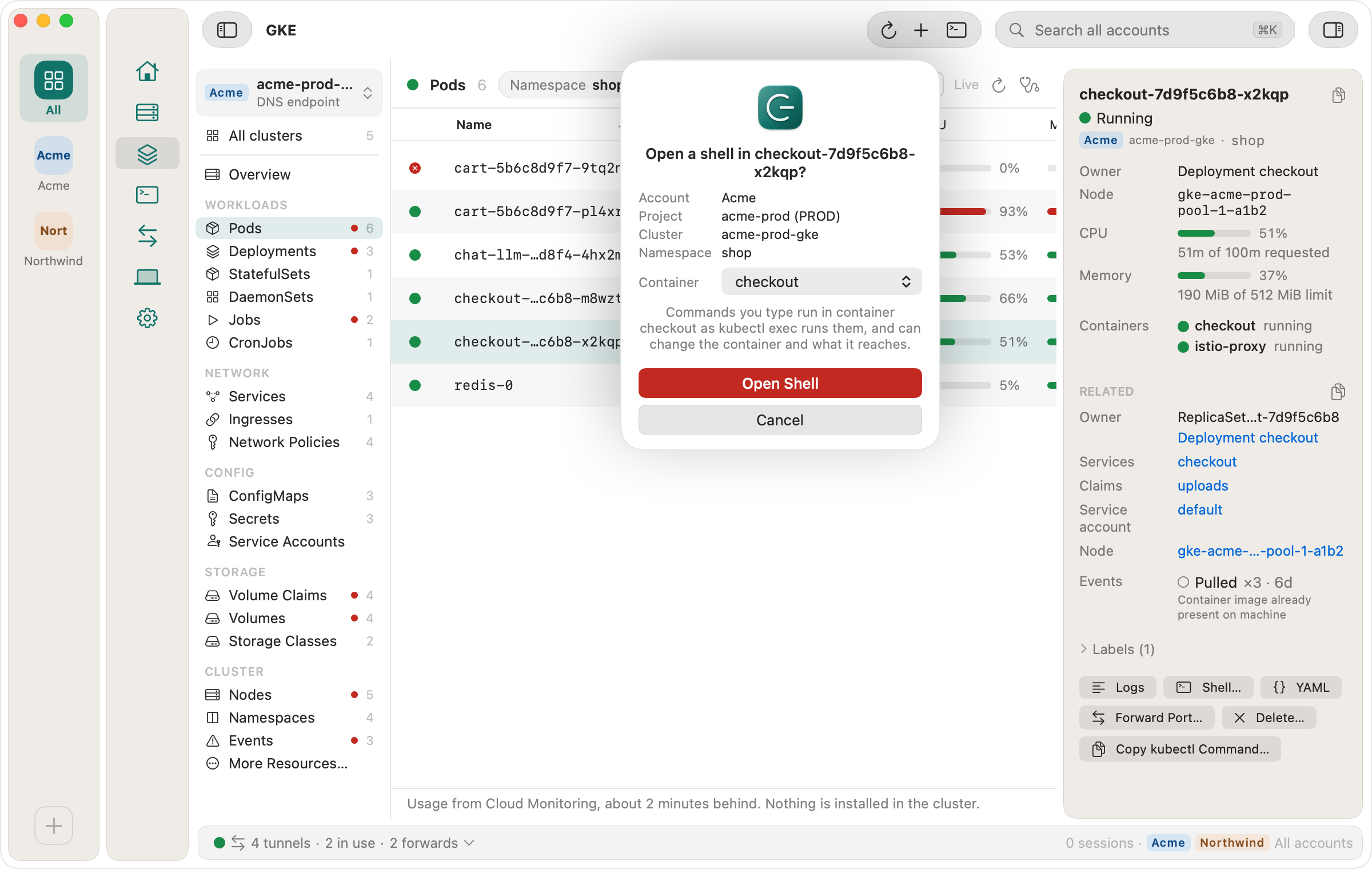
In Ostgate, Open Shell… in a pod's menu, or Shell… in its inspector, opens a
terminal tab in one of the pod's containers. Before anything opens, Ostgate asks the cluster
whether your account has get and create on
pods/exec in that namespace, and says which one is missing when it doesn't.
Then it asks you to confirm, naming the namespace, the cluster, its project and your
account. In a pod with more than one container you pick the container in the same dialog,
with the annotated default already chosen. The tab starts bash, or
/bin/sh if the image doesn't have it; a distroless image gets “No shell
in” and the container's name instead of a terminal. A cluster that Ostgate reaches
only through its public endpoint can't open a shell yet. Shell in
a container in the docs has the details.
GKE comes with Ostgate's 7-day trial and every licence, next to SSH, Remote Desktop, files and tunnels for Compute Engine VMs. Ostgate runs on Apple Silicon Macs with macOS 15 or later; see pricing.
Questions about GKE in Ostgate
Do I need gcloud or gke-gcloud-auth-plugin?
No. Ostgate signs in with your Google account in your own browser, and kubectl gets its token from Ostgate.
Does kubectl work when Ostgate is closed?
Yes, on every path except the bastion. kubectl starts Ostgate's command-line sign-in on its own. A context that reaches the cluster through a bastion VM needs Ostgate running, because the forward to the control plane runs in the app.
Does it install anything in my cluster?
No. The CPU, memory, volume and GPU bars come from the system metrics GKE already sends to Cloud Monitoring, and the cluster sees ordinary Kubernetes API requests made as your account.
Which tools work with the contexts?
kubectl and tools that read a kubeconfig and run its exec credential, such as k9s. Point them at ~/.kube/ostgate, or add it to KUBECONFIG.