kubectl for GKE without gcloud on a Mac
kubectl signs in to GKE through gke-gcloud-auth-plugin, and in its
default mode the plugin asks gcloud for every token. Without gcloud you have four options:
the same plugin reading Application Default Credentials, a small open-source helper that
reads them too, a ServiceAccount token pasted into the kubeconfig, or an app that hands
kubectl a token itself.
By Ostgate · Updated
Why kubectl needs gcloud
Google's kubectl page: “kubectl and other Kubernetes clients
require an authentication plugin, gke-gcloud-auth-plugin”, and “You
must install this plugin to use kubectl and other clients to interact
with GKE.” It installs with gcloud , or from the google-
package for apt and yum
(Install kubectl and configure cluster access).
The plugin's source is in kubernetes/, under
cmd/. In its default mode it gets each token by
running gcloud
(gcloud_token_provider.go), so gcloud has to be installed and signed in. The one
shortcut is the environment variable CLOUDSDK_: when it is
set, the plugin returns that token as is, without asking gcloud for a fresh one.
On our Mac, gcloud wrote a user entry that kubectl config view printed
like this (its installHint line left out), and kubectl listed the namespaces
through it:
user:
  exec:
    apiVersion: client.authentication.k8s.io/v1beta1
    command: /opt/homebrew/share/google-cloud-sdk/bin/gke-gcloud-auth-plugin
    interactiveMode: IfAvailable
    provideClusterInfo: true
That run used Google Cloud SDK 590.0.0 from the Homebrew cask, the plugin 0.5.20 and
kubectl v1.35.0, against GKE v1.36.4-gke.2046003 in europe-central2, on
3 November 2026.
The routes compared
| Route | What you install | Where the credential comes from | How long it lasts |
|---|---|---|---|
gcloud and gke-gcloud-auth-plugin |
gcloud with the plugin component | gcloud's own sign-in | An access token that gcloud refreshes |
| The plugin with Application Default Credentials | The plugin binary | An ADC file, made by gcloud or a service account key |
As long as the ADC file is valid |
gke-auth |
Go, then go |
Application Default Credentials | As above |
| ServiceAccount token | Nothing | A Secret someone creates in the cluster | Does not expire |
| Ostgate | The Ostgate app | Your Google sign-in in Ostgate | An access token that expires within the hour |
We ran the first route and Ostgate's. The other three are described from their source code and documentation; we did not run them.
The plugin with Application Default Credentials
The plugin has a flag for this: --,
described in cred.go as “Output is an ExecCredential filled with application
default credentials.” In that mode it asks for the scopes
https:// and
https://
(default_) and does not run gcloud. Add the flag
to args in the kubeconfig's user entry.
Google's page for a local machine starts with “Install the
Google Cloud CLI” and then runs gcloud , which writes
$HOME/
(Set up ADC for a local development environment,
How Application Default Credentials works).
The alternative is a service account key file named in
GOOGLE_, and Google warns that “Service account keys
create a security risk and are not recommended.” The plugin binary itself also ships in
gcloud's packages. So this route drops gcloud from each sign-in, not from the setup.
gke-auth
imjasonh/ is a
small Go program, “K8s cred helper and setup without gcloud”. It installs with
go and takes
--project, --location and --cluster. Its
main.go gets the token from google.,
which is Application Default Credentials, and prints it as an
ExecCredential. It needs the same ADC file as the route above.
A ServiceAccount token
A kubeconfig can carry a bearer token instead of an exec entry, and a
Kubernetes ServiceAccount can have one stored in a Secret of type
kubernetes.io/. The Kubernetes documentation
calls this “a legacy mechanism that provides long-lived ServiceAccount credentials”, and
says: “You should only create a ServiceAccount token Secret if you can't use the
TokenRequest API to obtain a token, and the security exposure of persisting a
non-expiring token credential in a readable API object is acceptable to you”
(Secrets: ServiceAccount token Secrets).
Such a kubeconfig needs no Google tooling, but whoever has the file can act as that ServiceAccount until someone deletes the Secret. Someone who may create ServiceAccounts and Secrets in the cluster has to set it up and grant the ServiceAccount its permissions. Kubernetes also notes that “anyone who is authorized to create a Pod in a namespace can use that access to read any Secret in that namespace” (Secrets).
Over a cluster's DNS-based endpoint, the gke.goog name, a ServiceAccount token
works only if the cluster accepts such tokens there. gcloud 543.0.0 (14 October 2025) added
--enable-k8s-tokens-via-dns to clusters ,
create-auto and update: “This flag enables authentication to the
cluster's control plane by using KSA tokens, via dns endpoint”
(Google Cloud SDK release
notes). Our Autopilot test cluster on GKE 1.36 has it off;
gcloud shows
enableK8sTokensViaDns: under
controlPlaneEndpointsConfig.. There a valid token for a test
ServiceAccount got a 401 from Google's front end, and kubectl printed
You .
Google's advice: “Unless your use case requires one of these authentication
methods, use IAM credentials to authenticate to your control plane.” The run is in
x509 on the GKE DNS
endpoint, with the certificate error a pinned cluster CA causes on the same name.
How Ostgate does it
Ostgate signs in to Google in your browser and keeps the
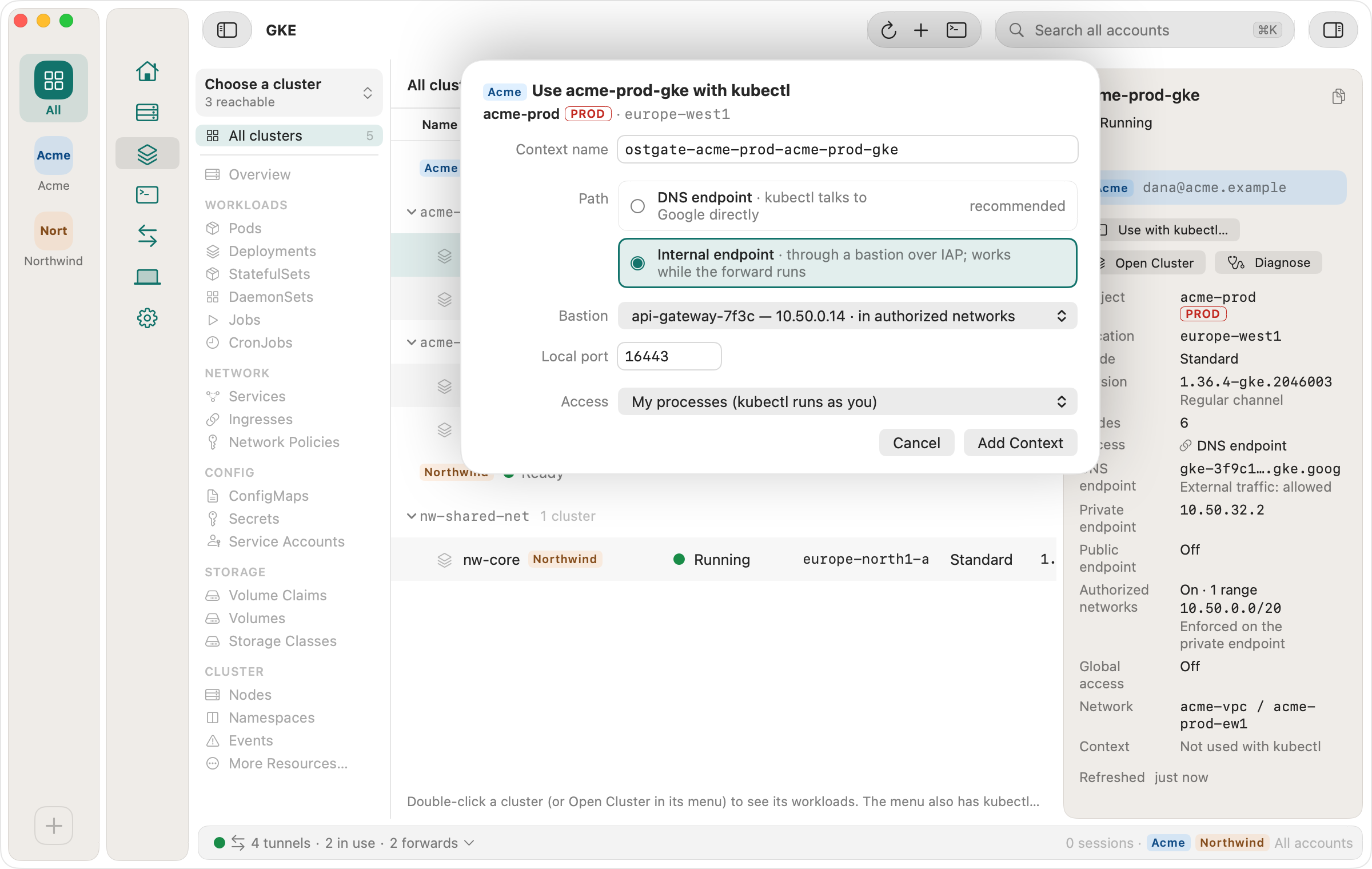
refresh token in the macOS Keychain. Its Use with kubectl… sheet, on a cluster in the
GKE area, adds a context to ~/.kube/ostgate whose sign-in command is
Ostgate itself:
- In GKE, select the cluster and choose Use with kubectl….
- Keep the Context name (by default
ostgate-) and the Path Ostgate marks “recommended”, then click Add Context.<project>- <cluster> - Run the two commands the sheet shows:
export KUBECONFIG="$HOME/.kube/config:$HOME/.kube/ostgate"
kubectl --context ostgate-acme-prod-acme-prod-gke get namespaces
kubectl then shows a user entry like this one:
user:
  exec:
    apiVersion: client.authentication.k8s.io/v1
    command: /Applications/Ostgate.app/Contents/MacOS/Ostgate
    args:
    - kube-credential
    - --profile
    - <profile id>
    - --context
    - ostgate-acme-prod-acme-prod-gke
    interactiveMode: Never
kubectl runs that command, and Ostgate prints an ExecCredential with the
account's current access token. No gcloud and no plugin are involved, and the Ostgate
window does not need to be open. In our run on 3 November 2026, with Ostgate not running,
kubectl listed the namespaces in 0.85 seconds, the token
expired 1,995 seconds after the call, and k9s listed the pods of a namespace through the
same context. Ostgate answers only for contexts you added; for any other it prints
“Ostgate has no context … for this account. Open Use with kubectl in Ostgate.” and kubectl
stops.
The sheet also offers the cluster's other ways in, such as an internal endpoint through a bastion VM over IAP; the GKE docs describe each path, and kubectl to a private GKE cluster from a Mac covers private control planes.
When kubectl can't sign in
| kubectl prints | Cause | Fix |
|---|---|---|
getting |
The kubeconfig names the plugin without a path, and its folder is not on PATH. The Homebrew cask installs it under /opt/homebrew/ and does not link it into /opt/homebrew/ |
Add that folder to PATH, or put the absolute path in command: |
Ostgate |
The context was removed in Ostgate, or belongs to another account | Open Use with kubectl… on the cluster again |
Sign |
Google refused the stored sign-in, or it is missing | Sign in again to that account in Ostgate |
Installing the plugin itself, and the not-found error in apps opened from the Dock, are covered in gke-gcloud-auth-plugin on a Mac.
Questions
Can kubectl reach GKE without gke-gcloud-auth-plugin?
Yes. Any credential plugin that prints a Google access token as an ExecCredential will do, such as gke-auth or Ostgate's kube-credential. The other option is a ServiceAccount token written into the kubeconfig, which does not expire.
Does gke-gcloud-auth-plugin work without gcloud installed?
With --, where it reads Application Default Credentials instead of running gcloud config config-. Google's setup for that file on a laptop is gcloud auth application-, or a service account key, which Google says is not recommended. It also skips gcloud when CLOUDSDK_ holds a token, which it passes on as is.
Why does kubectl say executable gke-gcloud-auth-plugin not found?
The kubeconfig names the plugin without a path and the plugin's folder is not on PATH. The Homebrew cask puts it in / without a link in /opt/homebrew/bin. Add that folder to PATH or write the absolute path into the kubeconfig's command field.
Is a ServiceAccount token kubeconfig safe on a laptop?
It is a credential that does not expire: anyone who copies the file can act as that ServiceAccount until the Secret is deleted. The Kubernetes documentation calls it a legacy mechanism and recommends short-lived tokens from the TokenRequest API instead.
Ostgate runs on Apple Silicon Macs with macOS 15 or later, with a 7-day trial and no sign-up. Setup is in the GKE docs.