kubectl to a private GKE cluster from a Mac
A private GKE control plane has an address inside your VPC, and a Mac on the
internet has no route to it, so kubectl waits two and a half minutes and then prints
dial . Try the DNS-based endpoint first: when the
cluster allows it, one get-credentials gives kubectl a public
name and nothing else to set up. Otherwise authorized networks, an IAP bastion, the Connect
gateway or a VPN get kubectl there. We ran each from a Mac against GKE 1.36 in November 2026.
By Ostgate · Updated
Why kubectl times out on a private cluster
gcloud with --internal-ip writes
the control plane's private address into the kubeconfig, for example
server: https://10.80.0.3. From a Mac outside the VPC, kubectl tried five times,
30 seconds apart, and gave up after 150 seconds:
Unable to connect to the server: dial tcp 10.80.0.3:443: i/o timeout
With --request-timeout=15s the same attempt ends sooner, with
context deadline exceeded (Client..
The cluster's endpoint settings decide which paths are open. If you are not sure which setting blocks you,
kubectl times out on a GKE
cluster sorts the errors by message.
The five paths, and what each one needs
| Path | Cluster setting | On your Mac |
|---|---|---|
| DNS-based endpoint | DNS access with external traffic allowed | gcloud and gke-gcloud-auth-plugin |
| Public endpoint | Public endpoint on, your public IPv4 in authorized networks | gcloud and the plugin |
| IAP bastion | The bastion's subnet in authorized networks; the bastion in the control plane's region or global access on | An SSH forward through IAP, tls-server-name in the kubeconfig |
| Connect gateway | The cluster registered to a fleet | The plugin on PATH |
| VPN | The VPN client range routed into the VPC and in authorized networks | A VPN client |
DNS-based endpoint
A cluster with DNS-based access has a name of the form
gke-. When the
cluster allows external traffic on it, that name answers from the internet, and kubectl
needs no route into the VPC:
gcloud container clusters get-credentials acme-gke \
    --location=europe-central2-a --project=acme-prod --dns-endpoint
kubectl get ns
The kubeconfig entry points server: at the gke.goog name and has no
certificate-, because the endpoint's certificate comes
from a public CA. gcloud 590 writes the plugin's absolute path into this entry
(/opt/
with the Homebrew cask), so kubectl found it even with that directory off
PATH.
If the cluster blocks external traffic on the DNS endpoint, gcloud writes nothing and says so:
ERROR: (gcloud.container.clusters.get-credentials) controlPlaneEndpointsConfig.dnsEndpointConfig.allowExternalTraffic is disabled for cluster acme-gke.
A kubeconfig written while the endpoint was open gets an HTML page instead, starting with
Error and titled
Error 403 (Forbidden)!!1. An administrator of the cluster turns external
traffic on with:
gcloud container clusters update acme-gke \
    --location=europe-central2-a --project=acme-prod \
    --enable-dns-access
In our test the old kubeconfig worked two seconds after the command returned. A bastion
does not get around this setting: with external traffic off, the DNS endpoint answered with
the same 403 from a VM inside the VPC, and through private.
as well.
Public endpoint with your Mac's IP in authorized networks
If the cluster's public endpoint is on, it accepts kubectl from the ranges in its
authorized networks. For a Mac that is the public IPv4 address your traffic leaves from, as
a /32, or your office's NAT range. Two ways to read it from the terminal; the
first asks a Google name server, and both returned the same address on our Mac:
dig -4 +short TXT o-o.myaddr.l.google.com @ns1.google.com
dig +short myip.opendns.com @resolver1.opendns.com
--master- replaces the whole list, so read the
current ranges first and repeat them in the update:
gcloud container clusters describe acme-gke \
    --location=europe-central2-a --project=acme-prod \
    --format="value(controlPlaneEndpointsConfig.ipEndpointsConfig.authorizedNetworksConfig.cidrBlocks[].cidrBlock)"
10.80.1.0/24;10.99.0.0/24
Then add your address, here 203.0.113.7:
gcloud container clusters update acme-gke \
    --location=europe-central2-a --project=acme-prod \
    --enable-master-authorized-networks \
    --master-authorized-networks=10.80.1.0/24,10.99.0.0/24,203.0.113.7/32 \
    --enable-authorized-networks-on-private-endpoint
gcloud container clusters get-credentials acme-gke \
    --location=europe-central2-a --project=acme-prod
kubectl get ns
Keep --enable-
if the cluster already enforces the list on its private endpoint; ours did. Without
--dns-endpoint or --internal-ip, get-credentials wrote
the public IP as the server. kubectl listed namespaces one second after the update
returned. If the public endpoint is off, the update also needs
--no-enable-, which turns it on. Until your address is
in the list, kubectl times out with dial .
IAP bastion: ssh -L and tls-server-name
When the cluster has only its private endpoint, go through a VM in its VPC. The VM needs no
external IP: IAP carries SSH to it, and an SSH local forward carries kubectl's connection
from the VM to the control plane. The IAP side, a firewall rule and the tunnel role, is in
the IAP firewall and IAM checklist. On the
cluster side, kubectl through the forward failed with
Unable until the bastion's subnet range was in
the private endpoint's authorized networks. A bastion in another region got
net/http: until global access was on.
Write a kubeconfig entry for the private address, then start the forward in a separate terminal and leave it running:
gcloud container clusters get-credentials acme-gke \
    --location=europe-central2-a --project=acme-prod --internal-ip
gcloud compute ssh bastion-1 --tunnel-through-iap \
    --zone=europe-central2-a --project=acme-prod \
    -- -N -L 127.0.0.1:18443:10.80.0.3:443
Point the entry at the forward. gcloud names it
gke_:
kubectl config set-cluster gke_acme-prod_europe-central2-a_acme-gke --server=https://127.0.0.1:18443
kubectl now reaches the control plane and refuses its certificate:
Unable to connect to the server: tls: failed to verify certificate: x509: certificate is valid for 198.51.100.20, 10.97.0.1, 10.80.0.3, 198.51.100.21, not 127.0.0.1
The certificate also lists the names kubernetes,
kubernetes.default, kubernetes. and
kubernetes., but kubectl compares
an IP address only against the IP entries, so the message shows those. Tell kubectl which
name to expect:
kubectl config set-cluster gke_acme-prod_europe-central2-a_acme-gke --tls-server-name=kubernetes.default
kubectl get ns
The cluster entry then reads:
- cluster:
    certificate-authority-data: DATA+OMITTED
    server: https://127.0.0.1:18443
    tls-server-name: kubernetes.default
  name: gke_acme-prod_europe-central2-a_acme-gke
kubectl still checks the certificate against the cluster's CA, under the name
kubernetes.default. --insecure-
also lists namespaces, without that check, so prefer the server name. Sign-in is unchanged:
the entry still runs gke-gcloud-auth-plugin.
SOCKS proxy through the bastion
OpenSSH's -D turns the same SSH session into a SOCKS5 proxy, and kubectl can
use it with the kubeconfig that --internal-ip wrote. The server stays
https://10.80.0.3, an address the certificate lists, so no
tls-server-name is needed. Nothing gets installed on the bastion.
gcloud compute ssh bastion-1 --tunnel-through-iap \
    --zone=europe-central2-a --project=acme-prod \
    -- -N -D 127.0.0.1:18080
For one command, set the proxy in the environment:
HTTPS_PROXY=socks5://127.0.0.1:18080 kubectl get ns
To keep it, put it in the cluster entry:
kubectl config set-cluster gke_acme-prod_europe-central2-a_acme-gke --proxy-url=socks5://127.0.0.1:18080
It worked with the bastion's subnet in authorized networks, the same entry the forward above needs.
Connect gateway for fleet clusters
If the cluster is registered to a fleet, Google's Connect gateway carries kubectl's
requests to it. In our test it worked with the public endpoint off and external traffic
off on the DNS endpoint. Our project already had the cluster registered and the
gkehub, gkeconnect and connectgateway APIs
enabled.
gcloud container fleet memberships list --project=acme-prod
gcloud container fleet memberships get-credentials acme-gke \
    --location=europe-central2 --project=acme-prod
The entry's server is a regional gateway URL such as
https://.
On a Mac with gcloud from the Homebrew cask, the next kubectl command failed. Unlike
clusters get-credentials, this command writes the bare
command: , and the cask installs the plugin under
/opt/ without linking
it into /opt/:
Unable to connect to the server: getting credentials: exec: executable gke-gcloud-auth-plugin not found

It looks like you are trying to use a client-go credential plugin that is not installed.
Put the SDK's bin directory on PATH, and the same kubectl commands
work, including logs:
export PATH="$(gcloud info --format='value(installation.sdk_root)')/bin:$PATH"
kubectl get ns
The gateway has its own IAM check. An identity with only
roles/ got
Error , and the response body read
Permission followed by the membership.
An account with the project's Owner role needed no RBAC binding in our test.
VPN into the VPC
A VPN puts the private endpoint on your Mac's routing table, so kubectl can talk to
https://10.80.0.3 directly. We tested WireGuard to a VM in the cluster's
VPC, with a VPC route that sends the Mac's tunnel range 10.99.0.0/24 to that VM.
The control plane sees that range as the source, so it has to be in authorized networks.
Before it was, nc -z -G 5 10.80.0.3 443 connected and
kubectl get pods still failed:
Connection to 10.80.0.3 port 443 [tcp/https] succeeded!
Unable to connect to the server: EOF
After 10.99.0.0/24 was added to the list, kubectl get pods worked
47 seconds later, and so did logs and a port-forward.
What we tested on
On 3 November 2026, from a Mac on macOS 27 with no VPN: Google Cloud SDK 590.0.0 from the
Homebrew cask gcloud-cli, gke-gcloud-auth-plugin 0.5.20, kubectl
v1.35.0 and OpenSSH_10.3p1, against a zonal Standard cluster and a regional Autopilot
cluster, both on v1.36.4-gke.2046003 in europe-central2. The VPN run and the
bastion in another region are from 2 November 2026, on the same Standard cluster.
How Ostgate does it
Ostgate is a native macOS app for Compute Engine through IAP, and its forward profiles run
the bastion forward from the ssh -L section without a terminal or
gcloud. kubectl still signs in through gke-gcloud-auth-plugin, so gcloud stays
installed for that.
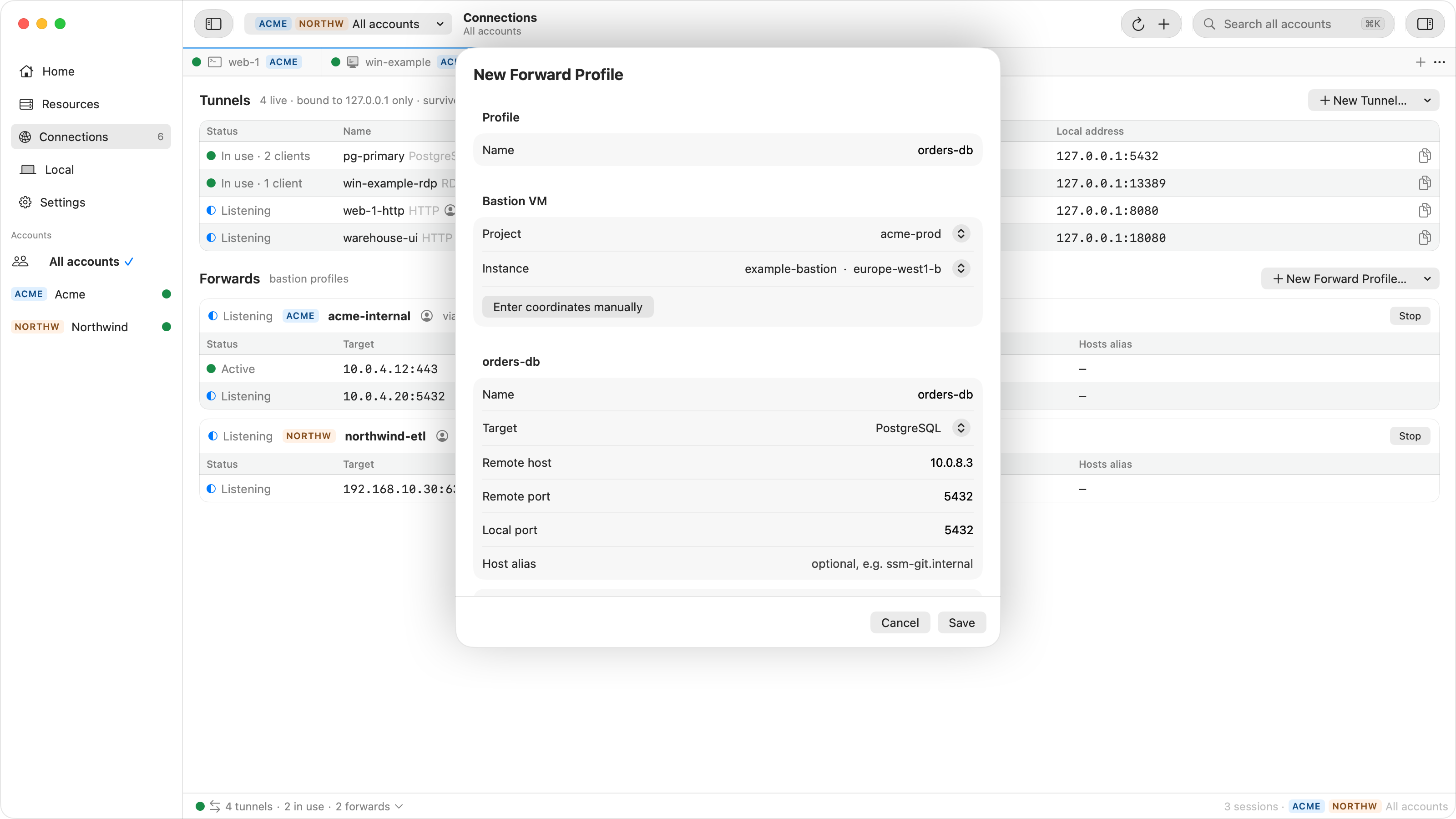
- In Connections › Forwards › New Forward Profile…, give the profile a Name, and under Bastion VM pick the project and the bastion instance.
- Set the forward's Target to Custom (host + port), Remote host to the
control plane's private address,
10.80.0.3in the example, Remote port to 443 and Local port to 18443. - Under Options, set Access to My processes, so kubectl, which runs as your macOS user, may connect to the port.
- Start the profile and point the kubeconfig entry at it:
kubectl config set-cluster gke_acme-prod_europe-central2-a_acme-gke --server=https://127.0.0.1:18443
kubectl config set-cluster gke_acme-prod_europe-central2-a_acme-gke --tls-server-name=kubernetes.default
On the first Start, Ostgate shows the bastion's host key for you to confirm, and the running profile is listed under Connections and in the menu bar. The forward profile settings are described in the tunnels and forwards docs. GKE support in the app itself is planned: see what's next.
When it does not connect
| kubectl or gcloud prints | Cause | Fix |
|---|---|---|
dial |
The kubeconfig points at the private address and the Mac has no route to it | Pick one of the five paths |
dial on the public IP |
Your public IP is not in authorized networks | Add it as a /32 |
x509: |
kubectl checks the certificate against the forward's address | tls-server-name: |
Unable |
The bastion's subnet or the VPN range is not in authorized networks | Add the range |
net/http: |
The bastion is in another region and global access is off | Enable global access |
allowExternalTraffic , or Error 403 (Forbidden)!!1 |
The DNS endpoint refuses traffic from outside Google Cloud | --enable-dns-access, or another path |
executable |
The kubeconfig names the plugin without a path and it is not on PATH |
Add the SDK's bin to PATH |
Error through the gateway |
The account lacks gkehub. |
An IAM role with that permission on the fleet project |
Each error with the setting behind it and the gcloud command that fixed it is in kubectl times out on a GKE cluster: find the setting that blocks it. Forwards through a bastion to other internal services are in reach any internal load balancer from a Mac.
Questions
Can I use kubectl on a private GKE cluster without a bastion?
Often, yes. If the cluster allows external traffic on its DNS-based endpoint, gcloud gives kubectl a public name. If the cluster is in a fleet, the Connect gateway relays kubectl even with the public endpoint off and the DNS endpoint closed to outside traffic. A public endpoint with your Mac's IP in authorized networks, or a VPN into the VPC, also works.
Why does kubectl say x509: certificate is valid for ..., not 127.0.0.1?
kubectl connects to your local forward at 127.0.0.1, and the control plane's certificate does not list that address. Set tls-server-name to kubernetes.default in the kubeconfig cluster entry, a name the certificate does list, and keep the certificate check.
Which range goes into authorized networks for a bastion VM?
The internal range of the bastion's subnet, which gcloud prints as ipCidrRange. Without it, kubectl through the bastion fails with EOF. Put the bastion in the control plane's region, or enable global access on the control plane.
Why does kubectl say executable gke-gcloud-auth-plugin not found after fleet get-credentials?
gcloud writes the bare command name gke-gcloud-auth-plugin. The Homebrew cask installs the plugin under /opt/homebrew/share/google-cloud-sdk/bin and does not link it into /opt/homebrew/bin, so kubectl cannot find it. Put the SDK's bin directory on PATH.
A bastion forward without a terminal. Ostgate runs on Apple Silicon Macs with macOS 15 or later, with a 7-day trial and no sign-up. Setup is in the tunnels and forwards docs.