PuTTY and WinSCP for GCP VMs on a Mac, over IAP
PuTTY and WinSCP are Windows programs, and neither has a Mac version. On a Mac,
the ssh, sftp and scp commands that come with macOS do
their jobs, and the Identity-Aware Proxy part of reaching a GCP VM works as it does on Windows:
gcloud carries the session, as a proxy command or as a tunnel to a local port.
This guide maps a PuTTY and WinSCP setup to the Mac, converts a .ppk key, and
covers graphical SFTP.
By Ostgate · Updated
How PuTTY and WinSCP reach a GCP VM on Windows
Both programs have a Local proxy type: instead of opening a TCP connection, they run a
command and send the session through its standard input and output, with %host
and %port replaced by the host and port you connect to. With the Google Cloud
CLI, the session's host name is the VM's name and the local proxy command is:
gcloud.cmd compute start-iap-tunnel %host %port --listen-on-stdin --zone=europe-west1-b --project=acme-prod
On Windows, gcloud compute ssh runs PuTTY tools that ship with the Google Cloud CLI and keeps your
key as google_compute_engine.ppk in your .ssh folder, next to the
OpenSSH files google_compute_engine and google_compute_engine.pub.
IAP Desktop, Google's Windows client, can also open a tunnel and start a client program
with it.
Neither program comes to the Mac. PuTTY's FAQ
(A.3.2) says the core team doubts it will ever finish a Mac version, and WinSCP's team has
said on its forum that there are no plans to support macOS. The IAP side moves over
unchanged: the same gcloud command feeds macOS's own ssh.
PuTTY for Mac with a GCP VM: OpenSSH or Homebrew
macOS ships OpenSSH. Its ~/.ssh/config takes the same command as PuTTY's local
proxy, with %h for the host:
Host example-vm
    User alice_example_com
    IdentityFile ~/.ssh/google_compute_engine
    ProxyCommand gcloud compute start-iap-tunnel %h 22 --listen-on-stdin --zone=europe-west1-b --project=acme-prod
Then ssh example-vm in Terminal opens the session. The firewall rule from
35.235.240.0/20 on tcp:22 and roles/iap.
are the same ones PuTTY needed (see SSH without
an external IP). An app opened from the Dock does not get your shell's
PATH, so for an app write gcloud's full path, which which gcloud
prints.
If you want PuTTY's own command-line tools, Homebrew's putty formula builds the
Unix version of PuTTY 0.85, which includes plink, pscp,
psftp and puttygen. plink takes the local proxy command
with -proxycmd:
brew install putty
plink -proxycmd "gcloud compute start-iap-tunnel %host %port --listen-on-stdin --zone=europe-west1-b --project=acme-prod" \
    -i ~/.ssh/google_compute_engine.ppk alice_example_com@example-vm
Use a PuTTY .ppk key on a Mac
OpenSSH does not read .ppk files; ssh answers Load key
"…": invalid format. PuTTYgen converts the key, and the public half stays the same, so
a VM that accepted it from PuTTY accepts it from ssh:
puttygen google_compute_engine.ppk -O private-openssh -o ~/.ssh/google_compute_engine chmod 600 ~/.ssh/google_compute_engine
You can also skip the old key. On a Mac, gcloud compute ssh creates an OpenSSH
key on first use and publishes it through OS Login or metadata.
WinSCP for Mac with a GCP VM: sftp or an SFTP app
With the ~/.ssh/config host above, macOS's sftp and
scp reach the VM by name:
sftp example-vm scp ./release.tar.gz example-vm:/tmp/
For a two-pane window like WinSCP's, graphical SFTP clients such as FileZilla or Cyberduck connect to a local tunnel. Start one and leave it running:
gcloud compute start-iap-tunnel example-vm 22 \
--local-host-port=localhost:2222 \
--zone=europe-west1-b --project=acme-prod
Then connect the client to localhost, port 2222, protocol SFTP,
with your VM username and private key. The SFTP guide
covers usernames and the errors these clients show. WinSCP itself reportedly runs under Wine,
according to its forum; the tunnel would still come from gcloud on the Mac.
PuTTY and WinSCP tools and their Mac equivalents
| On Windows | On a Mac |
|---|---|
| PuTTY | Terminal with ssh |
| Local proxy command | ProxyCommand in ~/.ssh/config |
| plink | ssh, or Homebrew's plink |
| pscp and psftp | scp and sftp |
| PuTTYgen | ssh-keygen; Homebrew's puttygen to convert .ppk |
| Pageant | ssh-agent, started by macOS |
| WinSCP | sftp, or a graphical client through a local tunnel |
SSH and SFTP in Ostgate, without gcloud
Ostgate is a native macOS app that opens IAP connections itself, as the Google account you
sign in with, so the Mac needs no gcloud and no key files carried over from
Windows:
- Connect on a Linux instance opens an SSH tab. The first time, Ostgate creates your key on the Mac, in the Secure Enclave where available, and publishes it through OS Login or instance metadata.
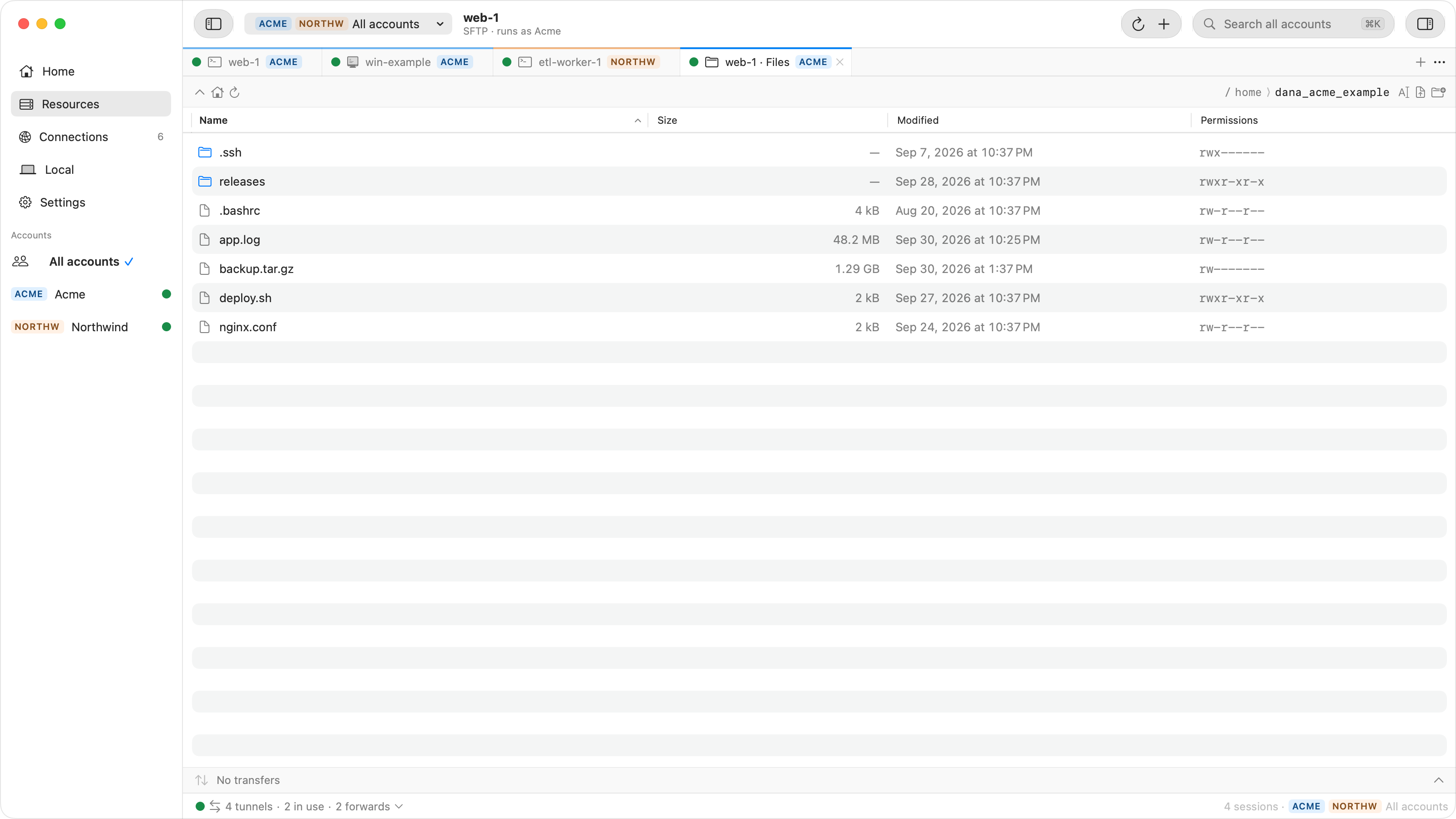
- Browse Files opens an SFTP browser in a tab: drag files and folders in from Finder to upload, and files out to Finder to download. Download… saves a folder, or several items at once, as one ZIP.
- Connect As… signs in with your own private key. OpenSSH ed25519 and RSA keys and
unencrypted PEM RSA keys work, so convert a
.ppkfirst, as above. - Settings › SSH Integration lets
ssh,scpandsftpreachexample-vm.europe-west1-b.acme-prod.gcpby name, and Tunnel to Port… gives FileZilla or Cyberduck a local port when its Access is set to My processes.
When the connection fails
| Message | Check |
|---|---|
Load key "…": invalid format |
The key is a .ppk. Convert it with puttygen. |
| No supported authentication methods available (server sent: publickey) | PuTTY-based tools offered no key the VM accepts for that user. |
| Permission denied (publickey) | The username, or a key missing from your OS Login profile or SSH keys metadata. |
Connection refused on localhost:2222 |
The start-iap-tunnel process is not running. |
Tunnel closes with 4003 or 4033 |
The firewall rule on tcp:22, or the IAP tunnel role; see IAP tunnel errors. |
| Received too large SFTP packet | A shell startup file on the VM prints text; see the SFTP guide. |
Questions
Is there a PuTTY for Mac?
Not from the PuTTY team as a Mac app. Homebrew builds the Unix version, whose command-line tools such as plink and puttygen work in Terminal, and macOS's own ssh does what PuTTY does on Windows.
Is there a WinSCP for Mac?
No. WinSCP runs on Windows only. On a Mac, use sftp and scp, a graphical SFTP client through a local tunnel, or an SFTP browser such as Ostgate's.
How do I use my PuTTY .ppk key on a Mac?
Convert it with puttygen google_compute_engine.ppk -O private-openssh -o ~/.ssh/google_compute_engine. The public key does not change, so the VM still accepts it.
Do I need gcloud on the Mac?
For the ProxyCommand and the local tunnel, yes. Ostgate opens IAP connections with your signed-in Google account and needs no gcloud.
SSH and SFTP to private VMs without gcloud or key files. Ostgate runs on Apple Silicon Macs with macOS 15 or later, and is paid after a 7-day trial with no sign-up. See SSH, files and Terminal in the docs.