gcloud switch account: several Google accounts on a Mac
gcloud keeps credentials for as many Google accounts as you sign in, but uses one
active account at a time. gcloud config set account switches it,
--account overrides it for one command, and named configurations keep one
account, project and region per client or organization. Application Default
Credentials, which client libraries use, are a separate single credential that none of
these switch. This guide covers each of them, service accounts through impersonation,
IAP tunnels and SSH as two accounts at once, and how Ostgate keeps several accounts
signed in side by side.
By Ostgate · Updated
Sign in several accounts
gcloud auth login runs Google's sign-in in the browser and stores the
account's credentials next to the ones already there. When it completes, it makes the new
account the active account of the current configuration. Sign in each account once:
gcloud auth login alice@example.com
gcloud auth login alice@acme.example
gcloud auth list shows every account with stored credentials and marks the
active one with an asterisk. Its help says there is no limit on the number of accounts
with stored credentials, and only one of them is active.
gcloud auth list
If an account already has valid credentials, gcloud auth login ACCOUNT makes
it active without opening the browser again; --force runs the sign-in anyway.
gcloud auth revoke ACCOUNT revokes a user account's token at Google and removes
its credentials from the Mac.
Switch the active account
The active account is the account property of the active configuration. To
change it for every later command:
gcloud config set account alice@acme.example
To run one command as another account and leave the active one alone, use the global
--account flag, which every gcloud command accepts:
gcloud compute instances list --project=northwind-dev --account=alice@example.com
A property can also come from the environment: CLOUDSDK_CORE_ACCOUNT sets the
account for every gcloud command in that terminal. gcloud looks for a property's value in
this order: the command's flag, then the CLOUDSDK_… environment variable, then
the active configuration.
Switching the account does not switch the project. If the configuration's project belongs to the other organization, the new account gets permission errors on it; set the project too, or use configurations as below.
One configuration per organization
A named configuration holds its own account, project and default region and zone. One per client or organization keeps them from mixing:
gcloud config configurations create acme
gcloud config set account alice@acme.example
gcloud config set project acme-prod
gcloud config set compute/region europe-west1
gcloud config set compute/zone europe-west1-b

gcloud config configurations create northwind
gcloud config set account alice@example.com
gcloud config set project northwind-dev
configurations create activates the new configuration, so the
config set lines after it write into it. Switch between them with:
gcloud config configurations activate acme
gcloud config configurations list
activate changes the configuration for every terminal, because it is stored
in one file. To use a different configuration in each terminal window, set the environment
variable instead; the global --configuration flag does the same for one
command:
export CLOUDSDK_ACTIVE_CONFIG_NAME=northwind
gcloud compute instances list --configuration=acme
gcloud picks the configuration from the --configuration flag first, then
CLOUDSDK_, then the one last activated.
Application Default Credentials do not follow
Client libraries, and the tools built on them, do not use gcloud's active account. They
use Application Default Credentials (ADC), which
gcloud auth application-default login writes to one file,
~/.config/.
The command's help says it has no effect on the accounts set up by
gcloud auth login, and that it overwrites credentials it wrote before. So:
gcloud config set accountandconfigurations activateleave ADC on whichever account last ranapplication-default login.- There is one ADC file per gcloud directory, so one ADC account at a time.
gcloud auth login --update-adcsigns in and writes ADC in one step. - A library looks first at
GOOGLE_; when that variable is set, the ADC file is not read at all.APPLICATION_ CREDENTIALS
For two ADC accounts at once, give each its own gcloud directory with
CLOUDSDK_CONFIG. Both gcloud and the client libraries read that variable,
so each terminal gets its own accounts, configurations and ADC file:
export CLOUDSDK_CONFIG="$HOME/.config/gcloud-acme"
gcloud auth login alice@acme.example --update-adc
Service accounts through impersonation
To act as a service account without downloading a key, sign in as yourself and
impersonate it. Your account needs a role with
iam. on the service account, such as
roles/:
gcloud compute instances list --project=acme-prod \
    --impersonate-service-account=deployer@acme-prod.iam.gserviceaccount.com
The flag works on any command. To impersonate for every command of a configuration, set the property in it:
gcloud config set auth/impersonate_service_account deployer@acme-prod.iam.gserviceaccount.com
ADC can impersonate too:
gcloud auth application-default login --impersonate-service-account=…
writes an ADC file that acts as the service account through your user credentials. A
comma-separated list of service accounts forms a delegation chain.
IAP tunnels and SSH as two accounts
gcloud compute start-iap-tunnel loads the account's credentials when it
starts and uses them for that tunnel until it exits. Two tunnels as two accounts are two
processes, each with its own --account or configuration:
gcloud compute start-iap-tunnel web-1 22 \
    --local-host-port=localhost:2222 \
    --zone=europe-west1-b --project=acme-prod \
    --account=alice@acme.example

gcloud compute start-iap-tunnel db-1 5432 \
    --local-host-port=localhost:5433 \
    --zone=europe-west1-b --project=northwind-dev \
    --account=alice@example.com
gcloud compute ssh --tunnel-through-iap takes the same flag. With OS Login,
it logs in as the POSIX username of the account it runs as, or of the impersonated service
account, so the same VM sees a different user for each account. In an
ssh_config ProxyCommand, put --account or
--configuration into the command, or the host follows whatever account is
active when ssh runs. Each account also needs the IAP role and a firewall rule
on its own projects; IAP TCP forwarding:
firewall rule and IAM lists them, and SSH
to a GCE VM without an external IP covers the tunnel itself.
How Ostgate does it
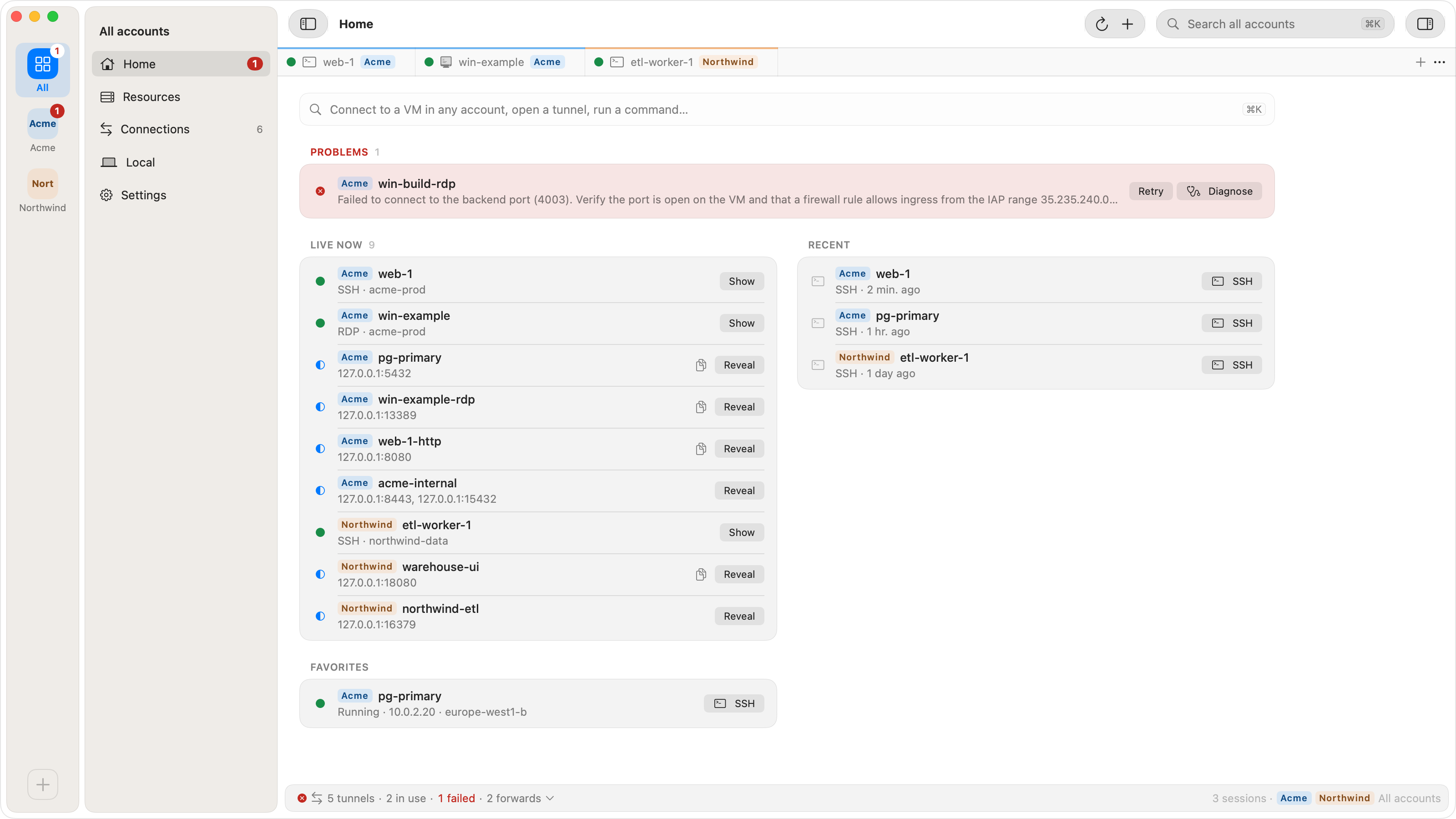
Ostgate is a native macOS app that opens IAP tunnels, SSH, SFTP and RDP sessions itself. It keeps several Google accounts signed in at once, with no active account to switch:
- Add Account… at the bottom of the account rail, along the window's left edge, signs in another Google account in your own browser. Each account keeps its own refresh token in the macOS Keychain, its own SSH key, tunnels and settings.
- Projects are pinned per account. With several accounts, Pin Project… asks which account the project belongs to, and every instance, tunnel and session runs as the account its project is pinned in.
- The rail has an All accounts tile and one tile per account; ⌥⌘1…9 selects them in order, and a tile's New Window opens a window for one account. Edit Tag… and Colour set the tag that marks the account's rows and tabs.
- SSH tabs use each account's own OS Login username or metadata key, so
alice@acme.exampleandalice@example.comcan have sessions to different VMs open at the same time. - An account whose sign-in has expired or was revoked shows needs you to sign in again. with Sign In Again…; signing in again keeps the account and its settings, and its open sessions keep running meanwhile. Without a network it shows can't be reached. with Check Again.
- Remove from This App… stops the account's sessions and tunnels and deletes what it left on the Mac: refresh token, SSH key, trusted host keys, saved passwords and settings. If an account removed earlier left items in the Keychain, Review… offers to delete them or restore the account.
- With Settings › SSH Integration installed,
sshfrom Terminal tries each signed-in account in turn, starting with those that have the instance's project pinned, until IAP lets one through. If none can,sshlists each account's reason.
Ostgate does not read or change gcloud's accounts, configurations or Application Default Credentials, and needs no gcloud on the Mac. Switching gcloud's account changes nothing in Ostgate, and the reverse. Ostgate signs in Google user accounts only: no service account keys and no impersonation. How the tokens are stored is on the Security page.
gcloud and Ostgate side by side
| Task | gcloud | Ostgate |
|---|---|---|
| Add an account | gcloud auth login |
Add Account… |
| Use another account | config set account or --account |
Pin the project in that account |
| Two accounts at once | One process or terminal per account | One window, All accounts |
| Project and region per client | Named configurations | Pinned projects per account |
Terminal ssh |
--account in the ProxyCommand |
Tries each account |
| Service accounts | --impersonate- |
Not supported |
When the wrong account is used
| Symptom | Cause | Fix |
|---|---|---|
| A command lists another organization's resources, or none | The active account or project is the other client's. | Check gcloud config list; activate the right configuration. |
| Permission denied on a project you can open in the Console | gcloud runs as your personal account, the Console as your work one. | Pass --account=alice@ or switch accounts. |
IAP tunnel closes with 4033 |
The account in use has no IAP role on that VM. | See 4033; check which account ran it. |
| Your code still acts as the old account | ADC was written for another account, or GOOGLE_ is set. |
Rerun gcloud auth application-default login, or unset the variable. |
| There was a problem refreshing your current auth tokens | The sign-in expired or was revoked, or the organization limits session length. | Run gcloud auth login for that account again. |
| You do not currently have an active account selected | The configuration has no account set. | gcloud config set account, or sign in. |
Questions
How do I switch the account gcloud uses?
Run gcloud config set account alice@acme.example to change the active account of the current configuration, or add --account=alice@acme.example to a single command. gcloud auth list shows every account with stored credentials and marks the active one. An account that is not in that list needs gcloud auth login first.
Can gcloud use two Google accounts at the same time?
Yes, per command or per terminal: --account on each command, or one named configuration per account, selected in each terminal with CLOUDSDK_. Each gcloud process uses one account for its whole run, so two IAP tunnels as two accounts are two gcloud processes.
Why does my code still use the old account after gcloud config set account?
Client libraries read Application Default Credentials, a separate credential that gcloud auth application-default login writes to one file. Changing gcloud's active account does not touch that file. Run gcloud auth application-default login again as the other account, or give each account its own CLOUDSDK_CONFIG directory.
Does Ostgate use my gcloud accounts?
No. Ostgate does not read or change gcloud's accounts, configurations or Application Default Credentials, and works without gcloud installed. Each Google account signs in to Ostgate once in your browser, and its refresh token is stored in the macOS Keychain.
Every Google account in one window. Ostgate runs on Apple Silicon Macs with macOS 26.3 or later, with a 7-day trial and no sign-up. See Install and sign in in the docs.