Guide
Reach an internal load balancer from a Mac through IAP
An internal Application Load Balancer, an internal passthrough load balancer or a Cloud Run service with internal ingress has an address only inside your VPC. From a laptop you reach it the way you reach a private database: through a VM in the VPC, over Identity-Aware Proxy. This guide sets up that forward and deals with what is different about HTTP services behind a load balancer: host names and TLS.
Updated
Why IAP cannot reach the load balancer directly
gcloud compute start-iap-tunnel connects to a port on a VM instance. A load
balancer's forwarding rule is not an instance, so there is nothing to name in that command.
What you can reach is any VM on the same network, and that VM can reach the load balancer.
So the path is: your Mac, IAP, a bastion VM, the load balancer's internal address.
Forward a local port through a bastion VM
The bastion needs no external IP: a firewall rule from 35.235.240.0/20 on
tcp:22, roles/iap. and SSH access are enough. Pick a VM
in the load balancer's region. If the load balancer's address is 10.0.4.12 and it
serves HTTPS on 443:
gcloud compute ssh example-bastion --tunnel-through-iap \
    --zone=europe-west1-b --project=acme-prod \
    -- -N -L 8443:10.0.4.12:443
The load balancer now answers on 127.0.0.1:8443 on your Mac. For a plain TCP
service behind an internal passthrough load balancer, a database or a message broker, that is
all: point the client at 127.0.0.1 and the local port. For a passthrough load
balancer the backends see the bastion's address as the client, so their firewall must admit
it.
Host names and TLS for HTTP services
Opening https://127.0.0.1:8443 in a browser usually fails for two reasons:
- The load balancer presents a certificate for the service's name, such as
api.internal.example, not for127.0.0.1, so the browser warns. - An internal Application Load Balancer picks the backend by host name through its URL map.
A request for
127.0.0.1matches no host rule and lands on the default backend, or on none.
Both are fixed by using the real name and pointing it at your Mac. Add a line to
/etc/hosts:
127.0.0.1 api.internal.example
Then open https://api.internal.example:8443. The certificate matches, the host
name reaches the URL map, and the traffic still goes through your forward. Remove the line
when you are done: while it is there, this Mac sends that name to 127.0.0.1
whether the forward runs or not.
Cloud Run services with internal ingress
A Cloud Run service with ingress set to internal refuses requests from the internet,
including your laptop. Requests from your VPC are accepted, and so is a request that arrives
through a VM in it. The same forward and host-name mapping works for the service's
run.app URL, as long as the VM can reach Cloud Run from inside the VPC, for
example through Private Google Access. Services that also require IAM authentication need an
identity token in each request on top of this.
How Ostgate does it
Ostgate is a native macOS app that sets up the same path without gcloud.
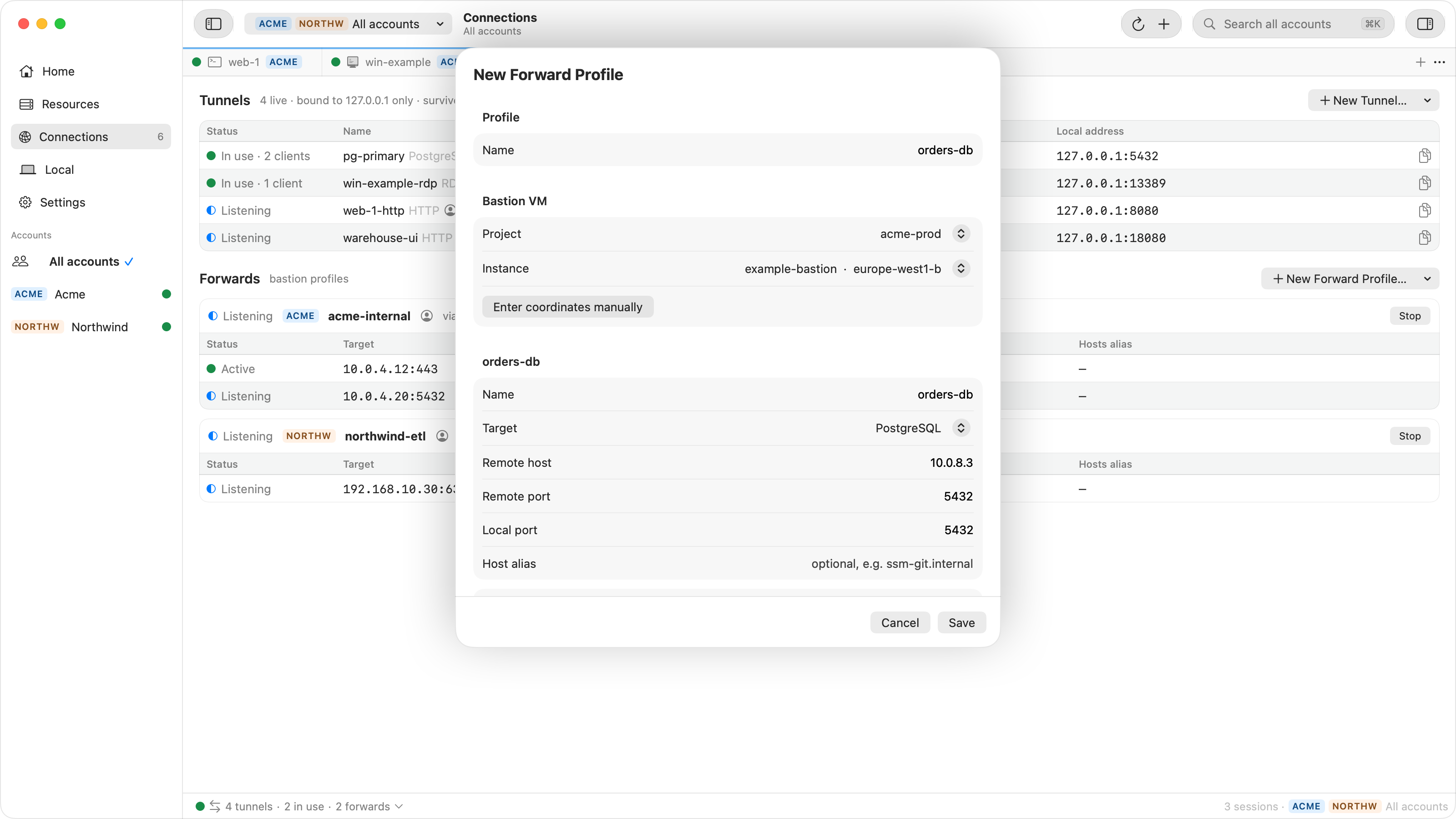
- Forward profiles (Connections › Forwards › New Forward Profile…) carry several ports through a bastion VM you choose, over one SSH session carried by IAP, to any address it can reach: an internal load balancer, a private database, another VM.
- Host aliases. A forward can have a host alias, and a profile can manage
/etc/hostswhile it runs: it adds the name for127.0.0.1when the profile starts and removes it when the profile stops, after macOS asks for an administrator's password. - Cloud Run › Open in Browser opens an internal-only service through a local proxy that speaks TLS to the service under its own name, so no hosts entry is needed. Services that require IAM authentication cannot be opened this way yet.
When it does not connect
| Symptom | Check |
|---|---|
| The SSH hop to the bastion fails | Firewall from 35.235.240.0/20 on tcp:22, the IAP tunnel role, and
OS Login or metadata key access to the VM. |
| The forward opens, requests time out | The bastion is in another region and the load balancer has no global access, or it is on another network. |
| Certificate warning | You are browsing by 127.0.0.1; map the service's name in
/etc/hosts and use it. |
| 404 or the wrong service answers | The URL map routes by host name; use the service's name, not the address. |
| Cloud Run answers 403 | The service requires IAM authentication, or the request did not arrive from inside the VPC. |
The bastion pattern for databases is in Cloud SQL private IP from a Mac, and single ports on a VM in port forwarding over IAP.
Questions
Can IAP TCP forwarding connect to the load balancer directly?
Not with a plain start-iap-tunnel: it connects to a port on a VM instance. To reach a load balancer's address, go through a VM that can route to it.
Does the bastion VM need a public IP?
No. IAP reaches the VM's internal address, so it needs only a firewall rule from 35.235.240.0/20 on tcp:22 and SSH access for you.
Why does https://127.0.0.1:8443 show a certificate warning?
The load balancer presents a certificate for the service's host name, and an internal Application Load Balancer routes by that name. Map the name to 127.0.0.1 in /etc/hosts and browse by the name instead.
Which region should the bastion VM be in?
The load balancer's region, unless global access is turned on for it: regional internal load balancers accept clients from their own region only by default.
Internal services in your browser. Ostgate runs on Apple Silicon Macs with macOS 26.3 or later, with a 7-day trial and no sign-up. Setup is in the tunnels and forwards docs.