Open an internal Cloud Run service from a Mac
A Cloud Run service or Cloud Run function with ingress set to
Internal still has a run.app URL, but a request to it from your laptop
gets a 404 page from Google and never reaches the container. Cloud Run accepts it only from
internal sources, such as a VPC network in the same project. So you send the request from a
VM in that network: reach the VM over Identity-Aware Proxy, forward a local port through it
to the service, and keep the service's own host name for TLS and routing.
By Ostgate · Updated
What Ostgate opens today. Ostgate's one-click route works only for a service or
function whose ingress is internal (or internal-)
and whose invoker is public: roles/ granted to
allUsers, or the invoker IAM check turned off. Services that require IAM
authentication are not supported yet: Ostgate does not mint identity tokens. For those,
use the manual route with an identity token in Services that require
IAM.
Know the trade-off before you make a service public to reach it this way: with
allUsers as invoker, internal ingress is the only barrier, so every workload
that can send traffic from the project's VPC networks, every on-premises host connected to
them by Cloud VPN or Cloud Interconnect, and the Google services ingress admits can call it
with no identity at all.
What internal ingress admits
Cloud Run has three ingress settings, set with gcloud run services update
--ingress:
all: requests from anywhere, including the internet.internal: requests from internal sources only. Google's ingress page lists them: VPC networks in the same project, Shared VPC ingress networks, VPC Service Controls perimeters, internal Application Load Balancers, and certain Google Cloud products such as Cloud Scheduler, Cloud Tasks, Eventarc, Pub/Sub and Workflows. Requests from on-premises resources connected to the VPC network by Cloud VPN or Cloud Interconnect also count as internal.internal-: whatand- cloud- load- balancing internaladmits, plus an external Application Load Balancer. Direct requests to therun.appURL from the internet are still blocked.
Your laptop on the internet is none of these. Cloud Run's troubleshooting page says such a
request does not reach the container and gets a 404, which does not appear in
the service's logs. gcloud run services proxy does not change that: it runs on
your Mac and sends the requests from there. Its own help text says the service must be
reachable from the machine running the command, and that with internal ingress
it will not work from outside the service's VPC network.
With Shared VPC, Google's private networking page adds a condition: traffic counts as internal only when the service runs in the host project, or when the service has Direct VPC egress or a Serverless VPC Access connector to the Shared VPC network. For the route through an internal Application Load Balancer with a serverless network endpoint group, see reach an internal load balancer from a Mac.
The bastion VM
Any VM on a VPC network of the service's project works as the bastion. Google's ingress page
states that requests from those networks are internal even if the VM has an external IP
address. It needs no external IP for you to reach it: IAP TCP forwarding connects to its
port 22 from 35.235.240.0/20. An administrator sets that up once (details in
IAP TCP forwarding: firewall rule and
IAM):
gcloud compute firewall-rules create allow-iap-ssh \
    --project=acme-prod --network=default \
    --direction=INGRESS --action=allow \
    --rules=tcp:22 \
    --source-ranges=35.235.240.0/20

gcloud projects add-iam-policy-binding acme-prod \
    --member=user:alice@example.com \
    --role=roles/iap.tunnelResourceAccessor
A VM without an external IP or Cloud NAT cannot reach Google services such as Cloud Run at
all, until its subnet has Private Google Access. Google's private networking page says that
with it, resources can reach Cloud Run at the default run.app URL and the
traffic stays in Google's network:
gcloud compute networks subnets update default \
    --region=europe-west1 --project=acme-prod \
    --enable-private-ip-google-access
The same page describes two alternatives: DNS that resolves run.app to
private. (199.36.153.8/30) or
restricted. (199.36.153.4/30), whose
ranges route through the VPC network, or a Private Service Connect endpoint with a private
DNS zone for run.app.
Forward a local port to run.app
Find the service's URL:
gcloud run services describe orders-api \
    --region=europe-west1 --project=acme-prod \
    --format='value(status.url)'
Say it prints https://orders-api-abc123-ew.a.run.app. Forward local port
8443 through bastion-1 to that host on port 443. The bastion resolves the name
and opens the connection, so the request leaves from inside the VPC:
ssh -N -L 8443:orders-api-abc123-ew.a.run.app:443 \
    -o ProxyCommand='gcloud compute start-iap-tunnel bastion-1 22 --listen-on-stdin --zone=europe-west1-b --project=acme-prod' \
    alice_example_com@bastion-1
Do not send the request to https://127.0.0.1:8443. The certificate is for the
run.app name, so curl rejects it, and the request should name the service, not
an address. Keep the real name and point it at the forward with
curl --resolve, which sets the TLS name from the URL; the explicit
Host header leaves the local port out of it:
curl --resolve orders-api-abc123-ew.a.run.app:8443:127.0.0.1 \
    -H 'Host: orders-api-abc123-ew.a.run.app' \
    https://orders-api-abc123-ew.a.run.app:8443/
A browser sends the name and port it was given and has no setting to override either, so browsing an internal service needs a local proxy that rewrites both. That is what Ostgate runs, below.
Services that require IAM
Ingress and authentication are separate checks. A service without allUsers as
invoker also wants an identity token from a principal with
roles/, sent as a bearer token. Google's developer
instructions use the account signed in to the gcloud CLI:
curl --resolve orders-api-abc123-ew.a.run.app:8443:127.0.0.1 \
    -H 'Host: orders-api-abc123-ew.a.run.app' \
    -H "Authorization: Bearer $(gcloud auth print-identity-token)" \
    https://orders-api-abc123-ew.a.run.app:8443/
For a user account, gcloud auth print-identity-token takes no audience: gcloud
refuses --audiences unless the credential is a service account. Google notes
that tokens for user accounts lack an audience claim, which makes them susceptible to replay
attacks, and recommends service account tokens with an audience for anything beyond testing.
For a service account, impersonated or not, set the audience to the service URL:
--audiences=.
Cloud Run answers 401 when the token's audience matches neither the service URL
nor a custom audience configured on it.
gcloud run services proxy adds tokens for you, but as shown above it cannot pass internal
ingress from a laptop.
Cloud Run functions
Cloud Functions (2nd gen) is now called Cloud Run functions, and each such function is a
Cloud Run service. Everything above applies to it: ingress, invoker, and the
run.app URL. A function created with gcloud functions deploy or the
Cloud Functions v2 API also has a cloudfunctions.net URL of the form
https://.
Google notes that this URL depends on the run.app one: disabling the
run.app URL also blocks it. Forwarding to the run.app host is the
simpler choice, since one name covers the certificate, the routing and, for IAM-protected
functions, the token audience.
Cloud Run functions (1st gen) are not Cloud Run services and have only the
cloudfunctions.net URL. Their ingress setting Allow internal traffic only
admits VPC networks in the same project or VPC Service Controls perimeter and a list of
Google services, and denies everything else with a 404.
How Ostgate does it
Ostgate is a native macOS app that opens IAP tunnels and the SSH hop itself, with no
gcloud on the Mac.
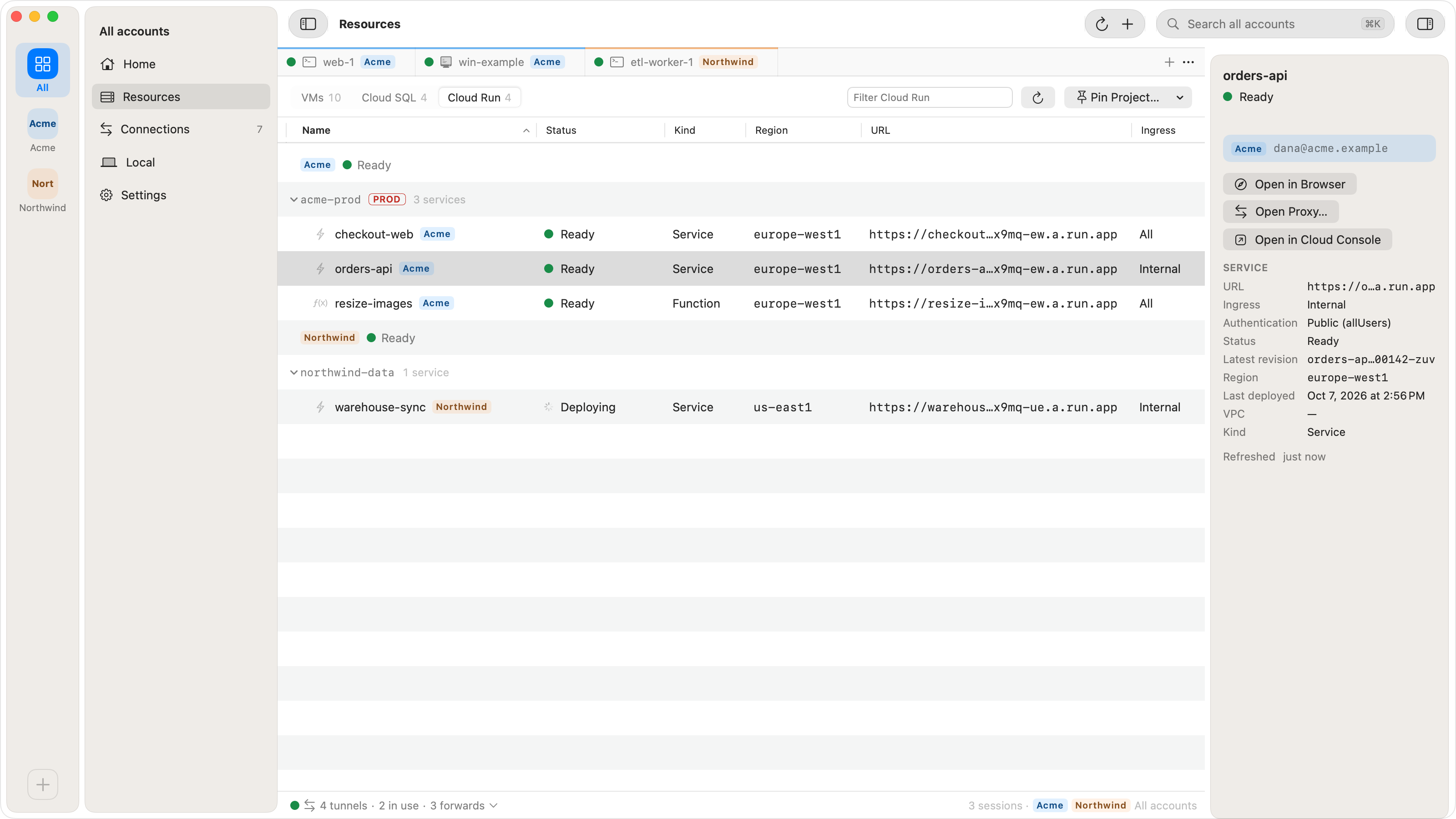
- Resources has a Cloud Run type that lists every service in every region of your pinned projects, with Kind, Region, URL, Ingress (All, Internal, Internal + LB) and Auth (Public or IAM). A Cloud Run function (2nd gen) is listed with the kind Function; 1st gen functions are not listed.
- Open in Browser on an internal service with a public invoker starts a local proxy
through a running VM of the service's own project and opens
http://. When it cannot pick one VM on its own, or the bastion's host key needs confirming, it opens the Open Proxy… sheet with the reason. A service with public ingress opens its127.0.0.1: PORT/ run.appURL directly. - Open Proxy… lets you choose the bastion, the local port and who may connect. Only VMs of the service's project qualify; Shared VPC and VPC Service Controls bastions are not supported. Choosing a VM without an external IP shows "No external IP: its subnet needs Private Google Access to reach *.run.app". Ostgate does not check that setting.
- The proxy sets
Hostto the service'srun.appname, speaks TLS to it with that name as SNI and verifies its certificate, and passes WebSocket upgrades and streamed responses through. It accepts only*.run.apphosts. A connection idle for 10 minutes is closed. - When the service cannot be reached through the bastion, the proxy answers
502 Bad Gatewaywith the reason; past 64 concurrent connections it answers503. - It does not rewrite
Locationheaders or cookies, so an absolute redirect to therun.appURL leaves the proxy. On a service with IAM auth, Open in Browser and Open Proxy… are disabled with "This service requires an identity token; Ostgate doesn't mint one yet (planned)."
When it does not answer
| Symptom | Cause | Fix |
|---|---|---|
| 404 page from Google, nothing in the service's logs | The request did not come from an internal source: your laptop,
gcloud run services proxy, or a VM in another project. |
Send it through a VM in the service's project. |
| 403 Forbidden: Your client does not have permission to get URL | No identity token, or the principal lacks
roles/. |
Add the bearer token; grant the role. |
| 401 | The token's audience is not the service URL or a custom audience. | Set --audiences to the URL, for a service
account. |
| Certificate name mismatch | The request went to 127.0.0.1, not the
run.app name. |
Use curl --resolve with the real name. |
| Forward opens, requests hang and time out | The bastion has no external IP and its subnet no Private Google Access. | Turn on Private Google Access for the subnet. |
| 502 Bad Gateway from Ostgate's proxy | The bastion could not connect to the service. | Read the reason in the body; check the bastion runs and can reach
run.app. |
Questions
Why does my internal Cloud Run service return 404 from my laptop?
With ingress set to internal, Cloud Run accepts requests only from internal sources, such as VPC networks in the same project. A request from the internet does not reach the container and gets a 404 that does not appear in the service's logs. Send it from a VM in the service's project, for example through an SSH port forward over IAP.
Does gcloud run services proxy work with internal ingress?
Not from a laptop. The proxy runs on your machine and sends the requests from there, so they are not internal. gcloud's help for the command says the service must be reachable from the machine running it, and that with internal ingress it will not work from outside the service's VPC network.
Does the bastion VM need an external IP?
No. IAP reaches its port 22 from 35.235.240.0/20. Without an external IP or Cloud NAT, the VM's subnet needs Private Google Access to reach the run.app URL. A VM with an external IP also counts as internal, as long as it is on a VPC network in the service's project.
Can Ostgate open an internal service that requires IAM authentication?
Not yet. Ostgate opens internal services whose invoker is allUsers, or whose invoker IAM check is off. For a service that requires IAM, forward a port through a bastion and add an identity token from gcloud auth print-identity-token to each request.
Internal services in your browser. Ostgate runs on Apple Silicon Macs with macOS 26.3 or later, with a 7-day trial and no sign-up. Setup is in the tunnels and forwards docs.