Guide
scp and rsync to a GCP VM without an external IP
Copying files to a Compute Engine VM that has no external IP works the same
way as SSH: Identity-Aware Proxy carries the connection. This guide covers
gcloud compute scp, plain scp and rsync through an IAP
ProxyCommand, why large copies through gcloud can crawl, and a drag-and-drop SFTP browser
on the Mac.
Updated
Before you start
Everything here runs inside an SSH connection, so the requirements are those of SSH without an external IP: a firewall
rule from 35.235.240.0/20 on tcp:22,
roles/iap., and a way to sign in (OS Login or a
metadata SSH key).
gcloud compute scp
The quickest route if the Google Cloud CLI is installed. It adds your key to the VM on first use and picks the user name:
gcloud compute scp ./backup.tar.gz example-vm:~/ \
    --tunnel-through-iap --zone=europe-west1-b --project=acme-prod
Swap the arguments to download, and add --recurse for a folder:
gcloud compute scp --recurse example-vm:~/releases ./releases \
    --tunnel-through-iap --zone=europe-west1-b --project=acme-prod
Large uploads through gcloud can be slow or seem to stall, because gcloud runs the IAP tunnel in Python. Google's IAP documentation recommends installing NumPy into gcloud's own Python to increase upload bandwidth:
$(gcloud info --format="value(basic.python_location)") -m pip install numpy
If gcloud still does not use it, Google's documentation adds
export CLOUDSDK_PYTHON_SITEPACKAGES=1 to your shell.
Plain scp and rsync through an IAP ProxyCommand
gcloud compute scp has no rsync mode and no resume. For those, let ordinary
ssh reach the VM through IAP by adding a host to
~/.ssh/config:
Host example-vm
    User dana_acme_example
    IdentityFile ~/.ssh/google_compute_engine
    ProxyCommand gcloud compute start-iap-tunnel example-vm 22 --listen-on-stdin --zone=europe-west1-b --project=acme-prod
User is your OS Login username, or the user your metadata key belongs to;
~/.ssh/google_compute_engine is the key gcloud created on its first
gcloud compute ssh. After that, the usual tools work unchanged:
scp ./nginx.conf example-vm:~/
rsync -avP ./releases/ example-vm:~/releases/
rsync -P shows progress and keeps partial files, so an interrupted copy
resumes. rsync must be installed on the VM too.
How Ostgate does it
Ostgate is a native macOS app that opens IAP tunnels itself, with no gcloud on
the Mac. It offers both routes:
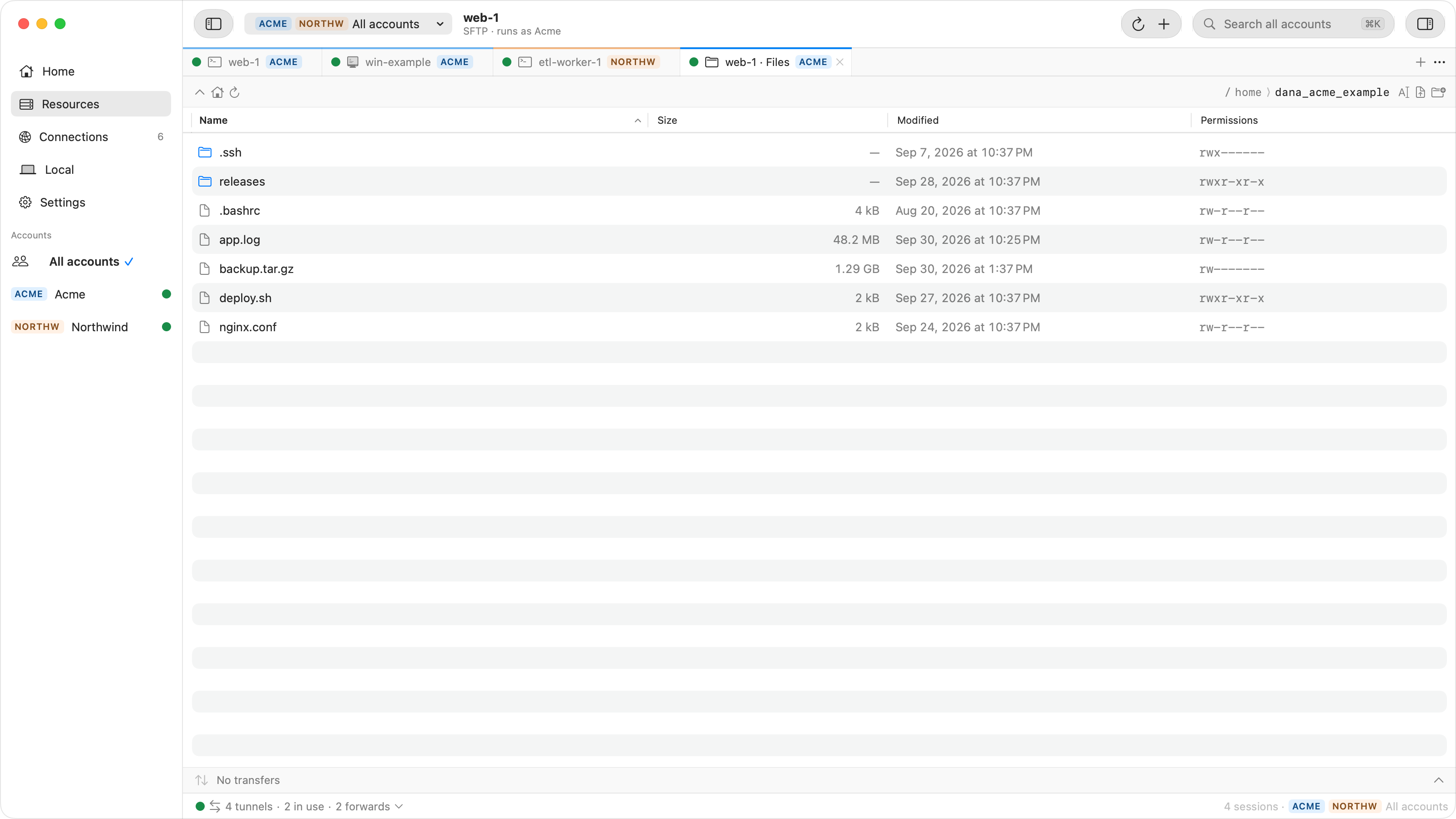
- Browse Files on an instance opens an SFTP browser in a tab, over the same IAP tunnel and sign-in as its terminal. Drag files in to upload and out to Finder to download; transfers show progress and can be cancelled without leaving a half-written file. You can also drop a file on an SSH terminal to upload it to your home folder.
- Settings › SSH Integration › Install adds one managed block to
~/.ssh/config. Thenscp,rsyncand your IDE reach any instance by name, with Ostgate's window closed:
scp ./nginx.conf web-1.europe-west1-b.acme-prod.gcp:~/
rsync -avP ./releases/ web-1.europe-west1-b.acme-prod.gcp:~/releases/
The block only carries the connection through IAP, using your signed-in Ostgate accounts.
ssh still signs in with your own keys from ~/.ssh, so your public
key must already be accepted by the VM.
Measured transfer times
One 50 MiB file to and from a Debian VM, from a Mac, with about 115 ms of round trip through IAP. Your numbers depend on your distance to the VM's region and your link; the comparison is what carries over.
| Route | Upload | Download |
|---|---|---|
| Ostgate SFTP browser | 10 s | 6 s |
scp through Ostgate's ProxyCommand | 15 s | 6 s |
| An SFTP client with one request in flight | 210 s | about 100 s |
The last row is why transfer tools over IAP must keep many requests in flight: with one at a time, each 32 KiB or 64 KiB block waits a full round trip. Ostgate's SFTP keeps 16 reads or 32 writes in flight per file.
When a copy fails
| Symptom | Check |
|---|---|
| Permission denied (publickey) | The wrong user name, or a key the VM does not accept: add it to your OS Login profile or to the instance's SSH keys metadata. |
Connection closed with 4003 |
No firewall rule from 35.235.240.0/20 on tcp:22, or sshd is not
running on the VM. |
Connection closed with 4033 |
The account lacks roles/iap.. |
| rsync: command not found | rsync is missing on the VM. Install it there, for example with
sudo apt-get install rsync. |
| Uploads through gcloud crawl | Install NumPy into gcloud's Python, as above, or use a native client. |
Questions
Why does gcloud compute scp stall or crawl on large files?
gcloud carries the IAP tunnel in Python. Google's documentation recommends installing NumPy into gcloud's Python to raise IAP TCP upload bandwidth. A client that runs the tunnel natively avoids the question.
Which user name do I use with plain scp?
With OS Login, your OS Login username, which looks like dana_acme_example; gcloud compute os-login describe-profile shows it. With metadata SSH keys, the user name the key was added for.
Does rsync work through IAP?
Yes. rsync runs over ssh, so any ssh command that reaches the VM through an IAP ProxyCommand works for rsync too. rsync has to be installed on the VM as well as on your Mac.
Do I need a firewall rule for file copies?
Only the one SSH already needs: ingress from 35.235.240.0/20 on tcp:22. scp, rsync and SFTP all run inside the SSH connection.
Drag files to a private VM. Ostgate runs on Apple Silicon Macs with macOS 26.3 or later, with a 7-day trial and no sign-up. See Use ssh from Terminal in the docs.